
Google Workspace Pricing in South Africa: A Comprehensive Guide
If you’re running a business in South Africa and trying to figure out whether Google Workspace is worth it — and what it’s actually going to cost you — you’re in the right place.
This guide is written for small business owners, startup founders, and IT decision-makers who want straight answers about Google Workspace pricing in South Africa without wading through jargon or sales pitches.
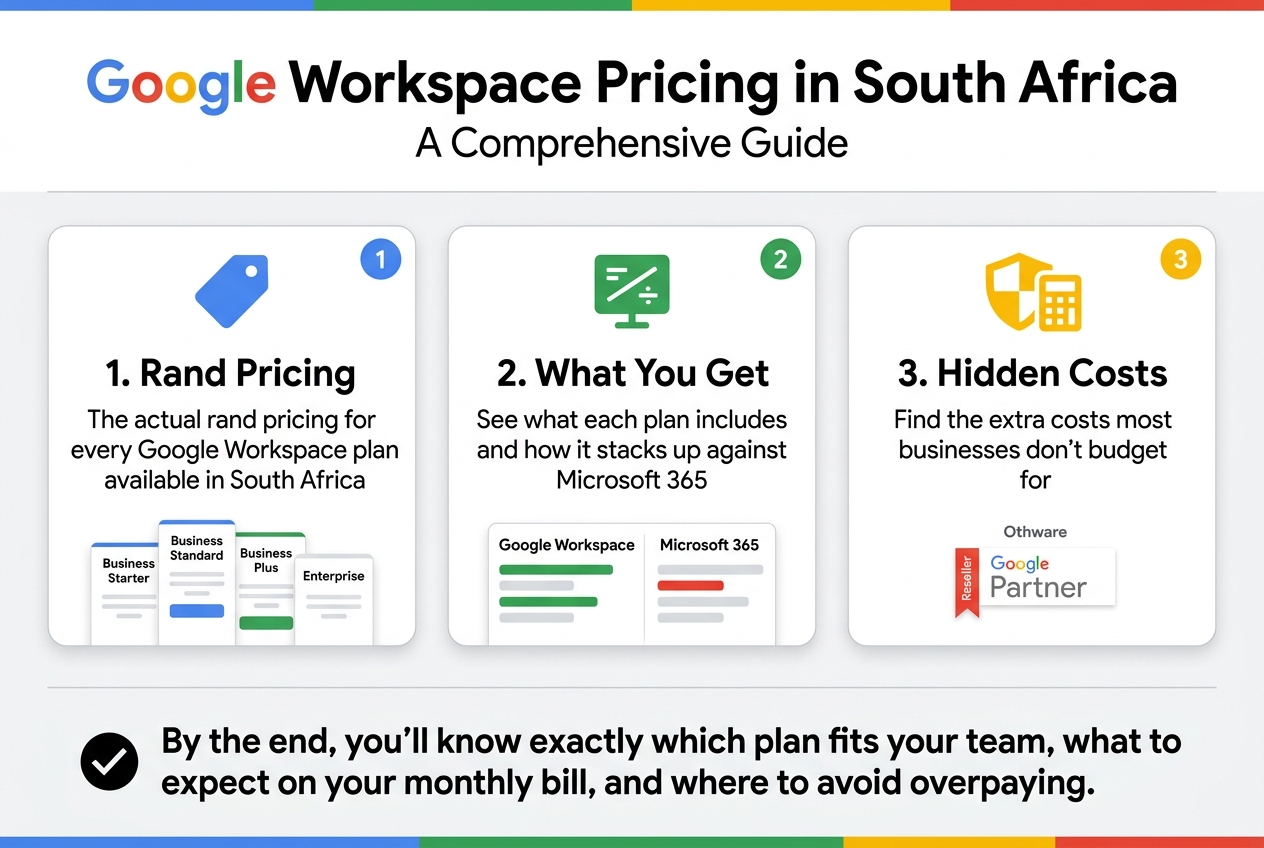
Here’s what we’ll cover:
- The actual rand pricing for every Google Workspace plan available in South Africa, from Business Starter to Enterprise
- What you get for your money — and how it stacks up against Microsoft 365 in the South African market
- The hidden costs most businesses don’t budget for, plus how to find the best Google Workspace deals through a certified reseller like Othware, a trusted Google Partner
By the end, you’ll know exactly which plan fits your team, what to expect on your monthly bill, and where to avoid overpaying.
Let’s get into it.
Overview of Google Workspace Plans Available in South Africa
Business Starter Plan Features and Who It Suits Best
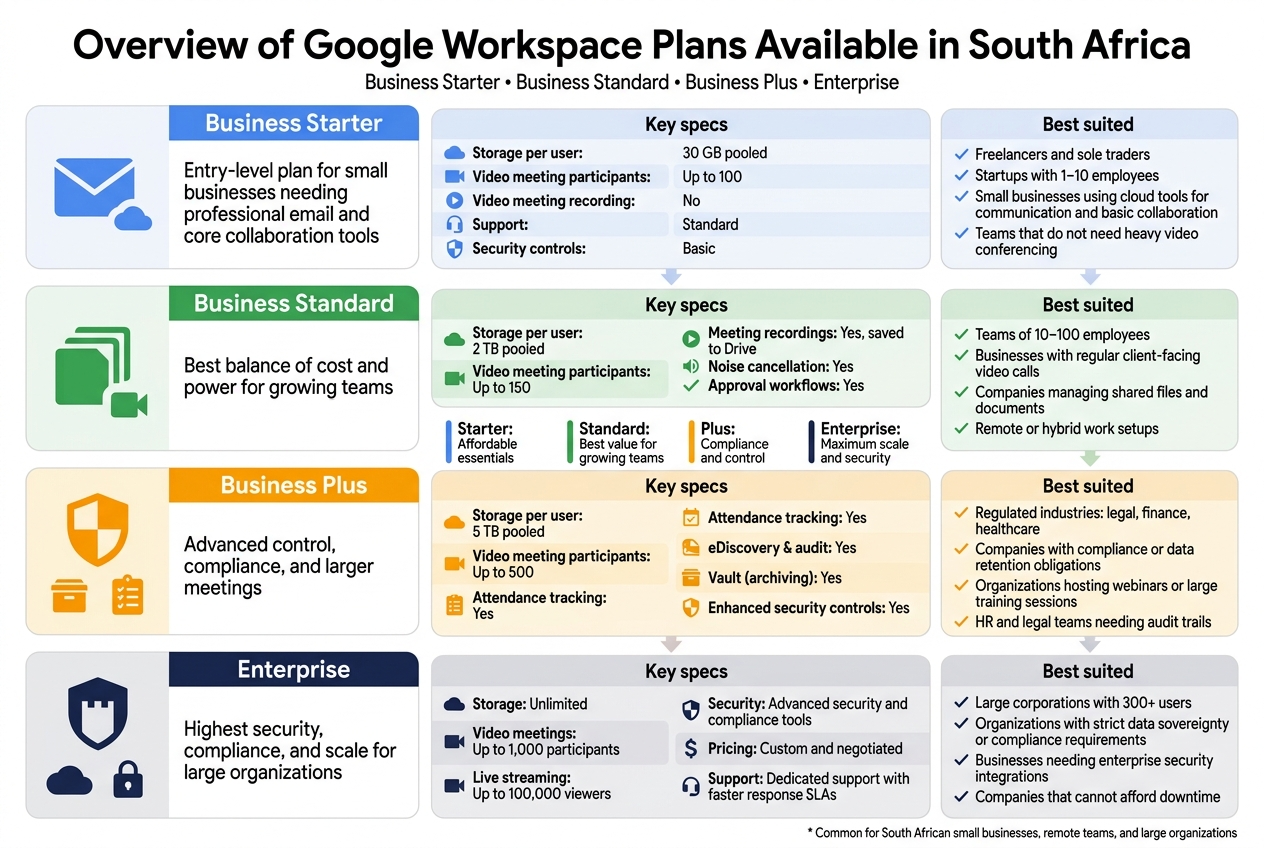
The Business Starter plan is Google Workspace’s entry-level offering, and for many South African small businesses, it hits the sweet spot between affordability and functionality.
Every user gets a professional Gmail address using your own domain (think name@yourcompany.co.za), which alone is worth the price of admission compared to free Gmail accounts that scream “we just started yesterday.” Beyond email, you get the full Google Workspace suite — Docs, Sheets, Slides, Meet, Drive, and Calendar — all working together seamlessly.
Key specs at a glance:
| Feature | Business Starter |
|---|---|
| Storage per user | 30 GB pooled |
| Video meeting participants | Up to 100 |
| Video meeting recording | No |
| Support | Standard |
| Security controls | Basic |
Best suited for:
- Freelancers and sole traders wanting a professional email presence
- Startups with 1–10 employees
- Small businesses that primarily use cloud tools for communication and basic document collaboration
- Teams that don’t need heavy video conferencing features
The 30 GB pooled storage feels tight if your team handles large files regularly, but for a business running on emails, proposals, and spreadsheets, it’s completely workable. If you’re exploring Google Workspace plans in South Africa for the first time and want to test the waters without a big financial commitment, Business Starter is where most people begin.
Business Standard Plan Upgrades and Key Benefits
Business Standard is where Google Workspace starts feeling genuinely powerful for growing South African businesses. The jump from Starter to Standard isn’t just a storage bump — it’s a meaningful upgrade in how your team can actually work together.
The headline upgrade is 2 TB of pooled storage per user, which takes the pressure off teams dealing with presentations, design files, or client documentation. But the real game-changer for most businesses is meeting recordings. You can record Google Meet calls directly to Drive, which is invaluable for remote teams, client calls, or internal training sessions.
What changes from Starter to Standard:
| Feature | Business Starter | Business Standard |
|---|---|---|
| Storage per user | 30 GB pooled | 2 TB pooled |
| Video meeting participants | 100 | 150 |
| Meeting recordings | No | Yes (saved to Drive) |
| Noise cancellation | No | Yes |
| Approval workflows | No | Yes |
Noise cancellation in Google Meet is genuinely useful in South African work environments where load shedding might have you working from a coffee shop or a generator-powered home office. Background noise gets filtered out automatically, which keeps calls professional.
Best suited for:
- Teams of 10–100 employees
- Businesses with regular client-facing video calls
- Companies managing significant amounts of shared files and documents
- Remote or hybrid work setups
For most Google Workspace for small business South Africa scenarios where the team has grown beyond the startup phase, Business Standard delivers the best balance of features and cost.
Business Plus Plan Advanced Capabilities Worth Knowing
Business Plus targets businesses that need tighter control over their data, more advanced meeting features, and stronger security without jumping to enterprise pricing. It’s not the most talked-about tier, but it has some features that specific businesses genuinely need.
The big additions here are eDiscovery and audit, enhanced security controls, and larger meeting capacity (up to 500 participants with attendance tracking). The attendance tracking in Meet alone is useful for companies running webinars, training sessions, or all-hands meetings where you need to know who actually showed up.
Business Plus additions over Standard:
| Feature | Business Standard | Business Plus |
|---|---|---|
| Storage per user | 2 TB pooled | 5 TB pooled |
| Video meeting participants | 150 | 500 |
| Attendance tracking | No | Yes |
| eDiscovery & audit | No | Yes |
| Vault (archiving) | No | Yes |
| Enhanced security controls | No | Yes |
Google Vault is a standout feature here — it lets businesses archive emails and chats for compliance purposes, which is critical for legal, financial, and healthcare businesses operating under data retention requirements in South Africa.
Best suited for:
- Businesses in regulated industries (legal, finance, healthcare)
- Companies with compliance or data retention obligations
- Organizations hosting large-scale virtual events or training programs
- HR and legal teams needing audit trails
Enterprise Plan Power Features for Large Organizations
The Enterprise plan is Google Workspace without limits — literally. Storage is unlimited, security controls are the most advanced available, and the support you get is in a completely different league.
Enterprise is designed for organizations where data security, compliance, and scale are non-negotiable. You get S/MIME encryption for Gmail, data loss prevention (DLP) policies, advanced endpoint management, and enterprise-grade support with guaranteed response times.
What sets Enterprise apart:
- Unlimited storage across all users
- 1,000 participant video meetings with live streaming to up to 100,000 viewers
- Advanced security and compliance tools including DLP, security center, and audit reports
- Custom and negotiated pricing — no published per-user rate
- Dedicated support with faster response SLAs
For large South African organizations — think corporates, government entities, large NGOs, or businesses with complex IT requirements — Enterprise pricing is negotiated directly through Google or an authorized Google Partner like Othware, which can help structure a deal that fits your headcount and usage patterns.
The honest reality is that most businesses in South Africa don’t need Enterprise. But for those that do, the investment reflects the level of infrastructure, security, and support that comes with it.
Best suited for:
- Large corporations with 300+ users
- Organizations with strict data sovereignty or compliance requirements
- Businesses needing enterprise security integrations with existing IT systems
- Companies that can’t afford downtime and need premium support guarantees
Exact Google Workspace Pricing in South Africa
Monthly vs Annual Billing Cost Comparison
Google Workspace pricing in South Africa follows the same global structure — you pay per user, per month, and you choose between monthly or annual billing. The catch? Annual billing is noticeably cheaper, but it locks you in for 12 months upfront.
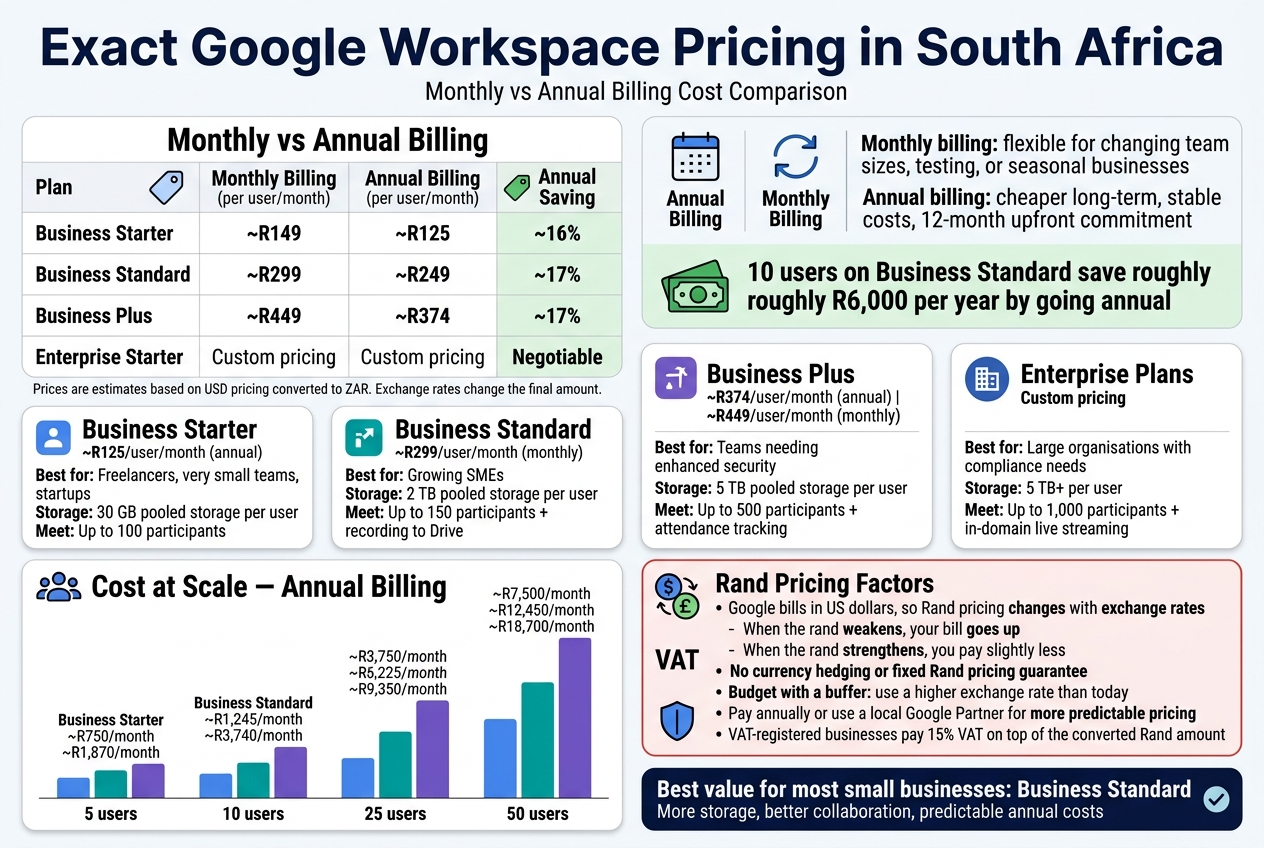
Here’s how the two billing options compare across the main plans (prices in ZAR, approximate based on current exchange rates):
| Plan | Monthly Billing (per user/month) | Annual Billing (per user/month) | Annual Saving |
|---|---|---|---|
| Business Starter | ~R149 | ~R125 | ~16% |
| Business Standard | ~R299 | ~R249 | ~17% |
| Business Plus | ~R449 | ~R374 | ~17% |
| Enterprise Starter | Custom pricing | Custom pricing | Negotiable |
Note: These figures are estimates based on Google’s USD pricing converted to ZAR. Actual billing amounts fluctuate with the exchange rate — more on that below.
Monthly billing makes sense if your team size changes often, you’re testing the platform, or you’re a seasonal business. Annual billing is the smarter long-term play if you have a stable headcount and want predictable costs. Over a 12-month period, a team of 10 on Business Standard saves roughly R6,000 per year by going annual — that’s not nothing.
Per User Pricing Breakdown Across All Plans
Google Workspace pricing in South Africa is charged per user, so your total monthly cost scales directly with your team size. Here’s a full breakdown of what each plan costs and what tier it targets:
Business Starter
- Price: ~R125/user/month (annual) | ~R149/user/month (monthly)
- Best for: Freelancers, very small teams, startups just getting off the ground
- Storage: 30 GB pooled storage per user
- Meet: Video calls up to 100 participants
Business Standard
- Price: ~R249/user/month (annual) | ~R299/user/month (monthly)
- Best for: Growing SMEs that need more storage and better collaboration tools
- Storage: 2 TB pooled storage per user
- Meet: Up to 150 participants + recording to Drive
Business Plus
- Price: ~R374/user/month (annual) | ~R449/user/month (monthly)
- Best for: Teams that need enhanced security, eDiscovery, and larger meetings
- Storage: 5 TB pooled storage per user
- Meet: Up to 500 participants + attendance tracking
Enterprise Plans
- Price: Custom — you need to contact Google or a Google Partner like Othware for a quote
- Best for: Large organisations with compliance requirements, advanced security needs, and big storage demands
- Storage: 5 TB+ per user with the option to request more
- Meet: Up to 1,000 participants + in-domain live streaming
Cost at Scale — Team Size Examples
| Team Size | Business Starter (Annual) | Business Standard (Annual) | Business Plus (Annual) |
|---|---|---|---|
| 5 users | ~R750/month | ~R1,245/month | ~R1,870/month |
| 10 users | ~R1,500/month | ~R2,490/month | ~R3,740/month |
| 25 users | ~R3,750/month | ~R6,225/month | ~R9,350/month |
| 50 users | ~R7,500/month | ~R12,450/month | ~R18,700/month |
For most small businesses in South Africa, Business Standard hits the sweet spot — the jump in storage alone from 30 GB to 2 TB per user is worth the extra spend, especially if your team works with large files, runs regular video meetings, or needs recording capabilities.
How Exchange Rates Affect Rand-Based Pricing
This is where Google Workspace pricing in South Africa gets a bit unpredictable. Google bills in US dollars — your South African Rand total is simply a conversion at whatever the current exchange rate happens to be when your invoice is generated.
What this means practically:
- When the rand weakens against the dollar, your Google Workspace bill goes up — even though nothing about your plan changed
- When the rand strengthens, you pay slightly less
- There’s no currency hedging or fixed Rand pricing guarantee from Google
Over the past few years, the USD/ZAR rate has moved from around R15 to R18+ per dollar. That kind of movement can add 10–20% to your effective cost without any change to your plan.
How to manage this exposure:
- Pay annually in advance — you lock in the cost at the rate applicable at the time of payment, rather than absorbing monthly fluctuations
- Budget with a buffer — when forecasting your Google Workspace cost South Africa spend, use a slightly higher exchange rate than the current one (e.g., if the rate is R18.50, budget at R19.50)
- Work with a local Google Partner — authorised resellers like Othware can sometimes offer Rand-denominated billing or more predictable pricing structures, which removes the exchange rate uncertainty from your accounting
One often-overlooked angle: if your business is VAT-registered, you’ll pay 15% VAT on top of the converted Rand amount. This is an additional cost that catches many small businesses off guard when they first sign up for Google Workspace monthly subscriptions.
The short version — Google Workspace pricing in South Africa is genuinely competitive on a global scale, but the Rand-dollar dynamic means you should never budget based on today’s exchange rate alone. Build in flexibility, and seriously consider annual billing or a local reseller arrangement to keep your costs stable and predictable.
What You Actually Get for Your Money
Storage Allocation Per User Across Each Plan
Storage is one of the biggest practical differences between Google Workspace plans, and it’s worth understanding exactly what you’re getting before you commit.
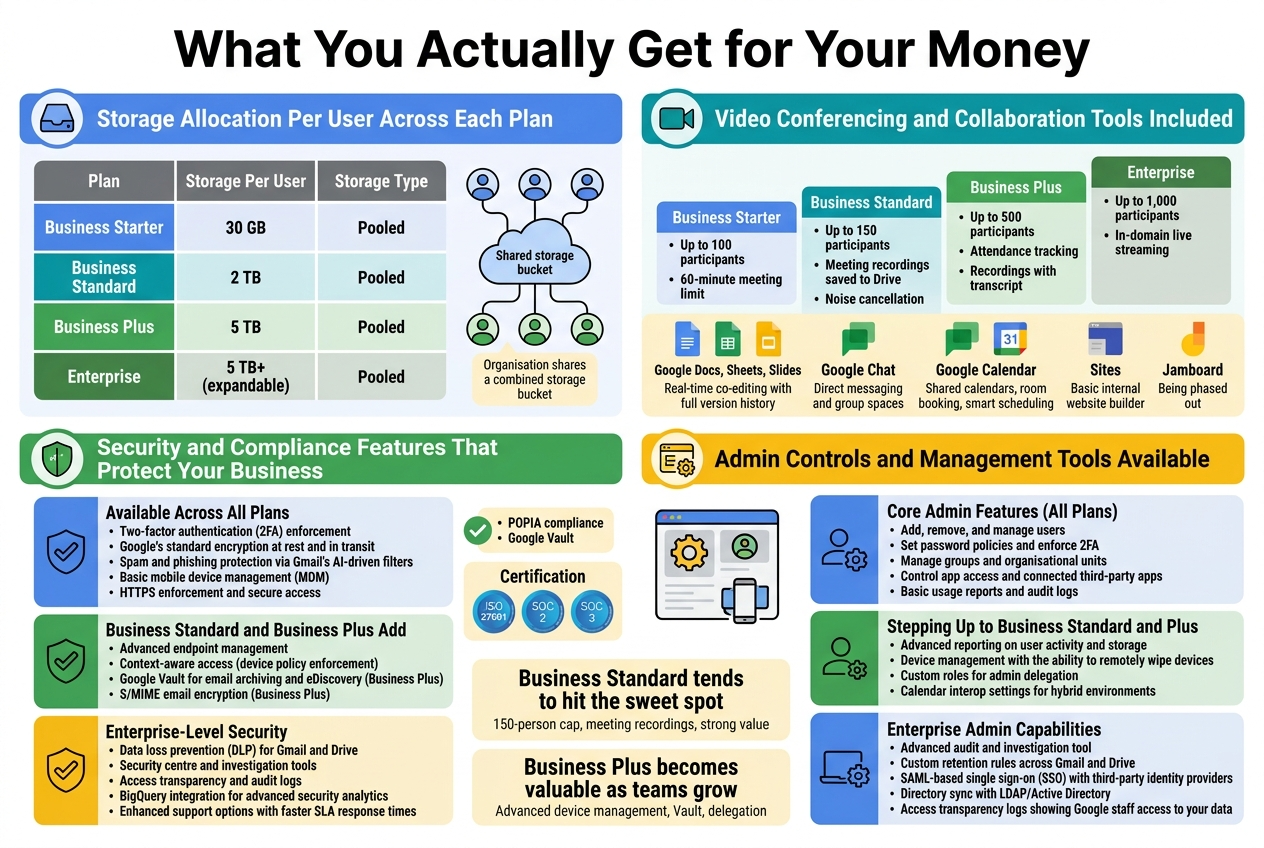
| Plan | Storage Per User | Storage Type |
|---|---|---|
| Business Starter | 30 GB | Pooled |
| Business Standard | 2 TB | Pooled |
| Business Plus | 5 TB | Pooled |
| Enterprise | 5 TB+ (expandable) | Pooled |
The “pooled” model means your organisation shares a combined storage bucket rather than each user getting a strict individual cap. So if you’re on Business Standard with 10 users, you have 20 TB total to distribute across your team however you need it. A developer who stores nothing can effectively donate their allocation to a video editor who needs more space.
For small businesses in South Africa running on tight budgets, Business Starter’s 30 GB per user is often enough for email, documents, and spreadsheets. Where it gets tight is when teams start storing large files like video recordings, design assets, or large datasets directly in Drive.
Video Conferencing and Collaboration Tools Included
Every Google Workspace plan includes Google Meet, but the feature set changes significantly as you move up.
Google Meet Capabilities by Plan
- Business Starter – Up to 100 participants, 60-minute meeting limit (the limit has been extended by Google at various points, so always verify current terms)
- Business Standard – Up to 150 participants, meeting recordings saved to Drive, noise cancellation
- Business Plus – Up to 500 participants, attendance tracking, recordings with transcript
- Enterprise – Up to 1,000 participants, in-domain live streaming
Beyond Meet, every plan gives you access to the full Google Workspace collaboration suite:
- Google Docs, Sheets, Slides – Real-time co-editing with full version history
- Google Chat – Direct messaging and group spaces, integrated with Meet
- Google Calendar – Shared calendars, room booking, smart scheduling
- Sites – Basic internal website builder for intranets or project hubs
- Jamboard (now being phased out, with Gemini-powered tools replacing some whiteboarding features)
For South African teams with remote workers spread across provinces, the Business Standard plan tends to hit the sweet spot — you get meeting recordings and a 150-person cap at a price that doesn’t break the bank compared to Business Plus.
Security and Compliance Features That Protect Your Business
Security across all Google Workspace plans is genuinely strong by default, but the higher tiers layer on controls that larger businesses and regulated industries need.
Available Across All Plans
- Two-factor authentication (2FA) enforcement
- Google’s standard encryption at rest and in transit
- Spam and phishing protection via Gmail’s AI-driven filters
- Basic mobile device management (MDM)
- HTTPS enforcement and secure access
Business Standard and Business Plus Add
- Advanced endpoint management
- Context-aware access (device policy enforcement)
- Google Vault for email archiving and eDiscovery (Business Plus)
- S/MIME email encryption (Business Plus)
Enterprise-Level Security
- Data loss prevention (DLP) for Gmail and Drive
- Security centre and investigation tools
- Access transparency and audit logs
- BigQuery integration for advanced security analytics
- Enhanced support options with faster SLA response times
For South African businesses dealing with POPIA (Protection of Personal Information Act) compliance, Google Vault — included with Business Plus and Enterprise — becomes particularly valuable. It lets you retain, search, and export data for compliance and legal hold purposes, which is exactly the kind of tool your legal team will eventually ask about.
Google also operates data centres with ISO 27001, SOC 2, and SOC 3 certifications, which matters when you’re dealing with clients who want assurance around data handling.
Admin Controls and Management Tools Available
The Google Admin console is included across every plan and is one of the cleaner management interfaces you’ll find in any productivity suite. What changes across plans is the depth of control available.
Core Admin Features (All Plans)
- Add, remove, and manage users
- Set password policies and enforce 2FA
- Manage groups and organisational units
- Control app access and connected third-party apps
- Basic usage reports and audit logs
Stepping Up to Business Standard and Plus
- Advanced reporting on user activity and storage
- Device management with the ability to remotely wipe devices
- Custom roles for admin delegation (so you’re not giving full admin access to your IT helpdesk)
- Calendar interop settings for hybrid environments
Enterprise Admin Capabilities
- Advanced audit and investigation tool
- Custom retention rules across Gmail and Drive
- SAML-based single sign-on (SSO) with third-party identity providers
- Directory sync with LDAP/Active Directory
- Access transparency logs showing Google staff access to your data
For small businesses in South Africa running Google Workspace Business Starter, the admin console gives you more than enough control to manage a lean team securely. As your headcount grows past 20–50 people, the delegation features and advanced device management in Business Plus start earning their keep — especially if you have staff using personal phones to access company data.
Working with a Google Partner like Othware means you can also get guided setup of these admin controls, so you’re not figuring out the console on your own when you’re also trying to run a business.
Google Workspace vs Competitors Pricing in South Africa
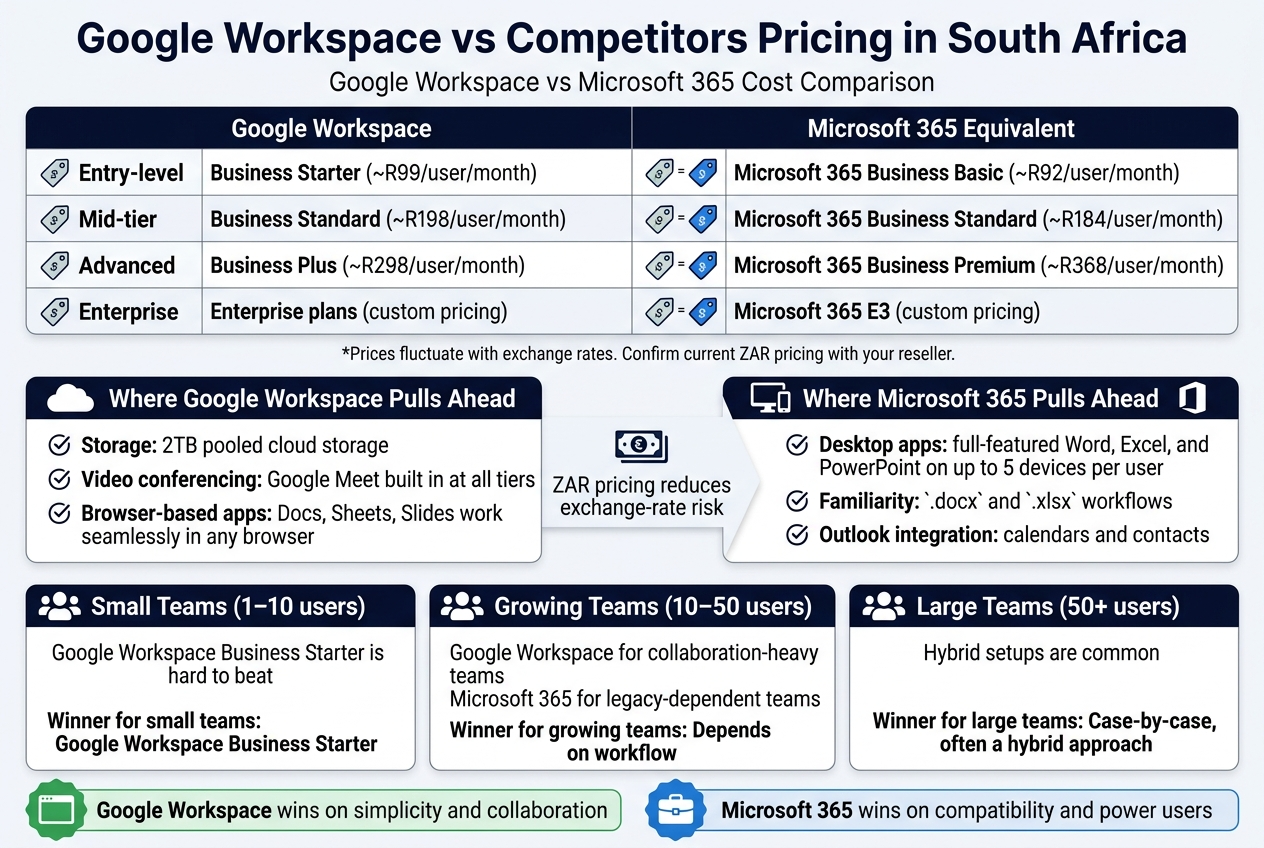
Google Workspace vs Microsoft 365 Cost Comparison
When you’re running a business in South Africa, every rand matters. Both Google Workspace and Microsoft 365 are solid productivity suites, but their pricing structures work very differently — and that gap can add up fast.
Here’s how the two stack up at current South African pricing:
| Plan | Google Workspace | Microsoft 365 Equivalent |
|---|---|---|
| Entry-level | Business Starter (~R99/user/month) | Microsoft 365 Business Basic (~R92/user/month) |
| Mid-tier | Business Standard (~R198/user/month) | Microsoft 365 Business Standard (~R184/user/month) |
| Advanced | Business Plus (~R298/user/month) | Microsoft 365 Business Premium (~R368/user/month) |
| Enterprise | Enterprise plans (custom pricing) | Microsoft 365 E3 (custom pricing) |
Prices fluctuate with exchange rates. Confirm current ZAR pricing with your reseller.
At first glance, Microsoft 365 looks slightly cheaper at the entry and mid levels. But the story changes once you dig into what’s actually included.
Where Google Workspace Pulls Ahead
- Storage: Google Workspace Business Standard gives every user 2TB of pooled cloud storage. Microsoft 365 Business Basic gives you 1TB per user on OneDrive, which sounds similar — but Google’s pooled storage model is far more flexible for teams that use storage unevenly.
- Video conferencing: Google Meet is built in at all tiers with no separate licensing. Microsoft Teams is included in 365 plans, but features like meeting recordings are gated behind higher tiers.
- Browser-based apps: Google’s apps (Docs, Sheets, Slides) work seamlessly in any browser with no local install needed. Microsoft’s web versions of Word, Excel, and PowerPoint are functional but noticeably stripped-down compared to the desktop apps.
Where Microsoft 365 Pulls Ahead
- Desktop apps: If your team lives in Excel with complex macros, or needs full-featured desktop Word and PowerPoint, Microsoft 365 Business Standard and above include desktop installations for up to 5 devices per user. Google Workspace has no desktop equivalent.
- Familiarity: South African businesses with legacy workflows built around
.docxand.xlsxfiles often find the transition to Google’s ecosystem more disruptive than expected. - Outlook integration: If your team is already heavily invested in Outlook calendars and contacts, staying on Microsoft’s stack avoids a painful migration.
Value for Money Assessment for South African Businesses
The rand/dollar exchange rate makes cloud software pricing volatile in South Africa. Both Google Workspace and Microsoft 365 are priced in USD at the source, meaning local costs shift with currency fluctuations. Working with a local Google Workspace reseller or a Google Partner like Othware can help you get billing in ZAR, which removes the currency risk from your monthly budget.
Beyond the exchange rate, here’s how to think about value:
Google Workspace wins on simplicity. There’s no patching, no version management, no worrying about whether everyone is on the same app version. Everything lives in the browser and updates automatically. For lean teams without dedicated IT support — which describes most small businesses in South Africa — this is a genuine advantage.
Microsoft 365 wins on compatibility. South African businesses that deal heavily with government departments, large corporates, or international clients often receive files in Microsoft formats. While Google Workspace handles .docx and .xlsx files reasonably well, formatting inconsistencies do crop up, especially with complex documents.
Google Workspace wins on collaboration speed. Real-time co-editing in Google Docs is still smoother and more reliable than the Microsoft equivalent. If your team collaborates heavily on documents, proposals, or spreadsheets simultaneously, this makes a tangible day-to-day difference.
Microsoft 365 wins for power users. Accountants, analysts, and project managers who need advanced Excel features, Access databases, or deep Outlook customisation will find Google’s tools limiting at the same price point.
Which Plan Wins for Small vs Large Teams
Small Teams (1–10 users)
For small South African businesses, Google Workspace Business Starter is genuinely hard to beat. The cost per user is low, setup is fast, and you get professional email on your own domain — something that immediately lifts credibility with clients.
Microsoft 365 Business Basic is marginally cheaper but often feels incomplete without the desktop apps, pushing smaller teams towards the pricier Business Standard tier anyway.
Winner for small teams: Google Workspace Business Starter
Growing Teams (10–50 users)
At this size, the choice depends on your team’s workflow. If collaboration is central to how you work — shared docs, joint proposals, team projects — Google Workspace Business Standard makes strong sense. The 2TB pooled storage, meeting recordings, and enhanced security features justify the step up in price.
If your team is heavily process-driven with legacy Microsoft workflows, migrating to Google at this scale can be disruptive enough to wipe out any cost savings.
Winner for growing teams: Depends on workflow — Google Workspace for collaboration-heavy teams, Microsoft 365 for legacy-dependent teams
Large Teams (50+ users)
At enterprise scale, both platforms offer custom pricing and dedicated support. Google Workspace Enterprise tiers add advanced security, compliance controls, and enhanced admin tools. Microsoft 365 E3 and E5 offer similar depth.
Large South African businesses often run hybrid setups — Google Workspace for most staff, with Microsoft licenses reserved for finance or legal teams that need desktop Office apps. This kind of flexible approach is worth exploring with a certified Google Partner like Othware, who can help structure licensing across a mixed environment without overspending.
Winner for large teams: Case-by-case, often a hybrid approach
Hidden Costs and Extras to Budget For
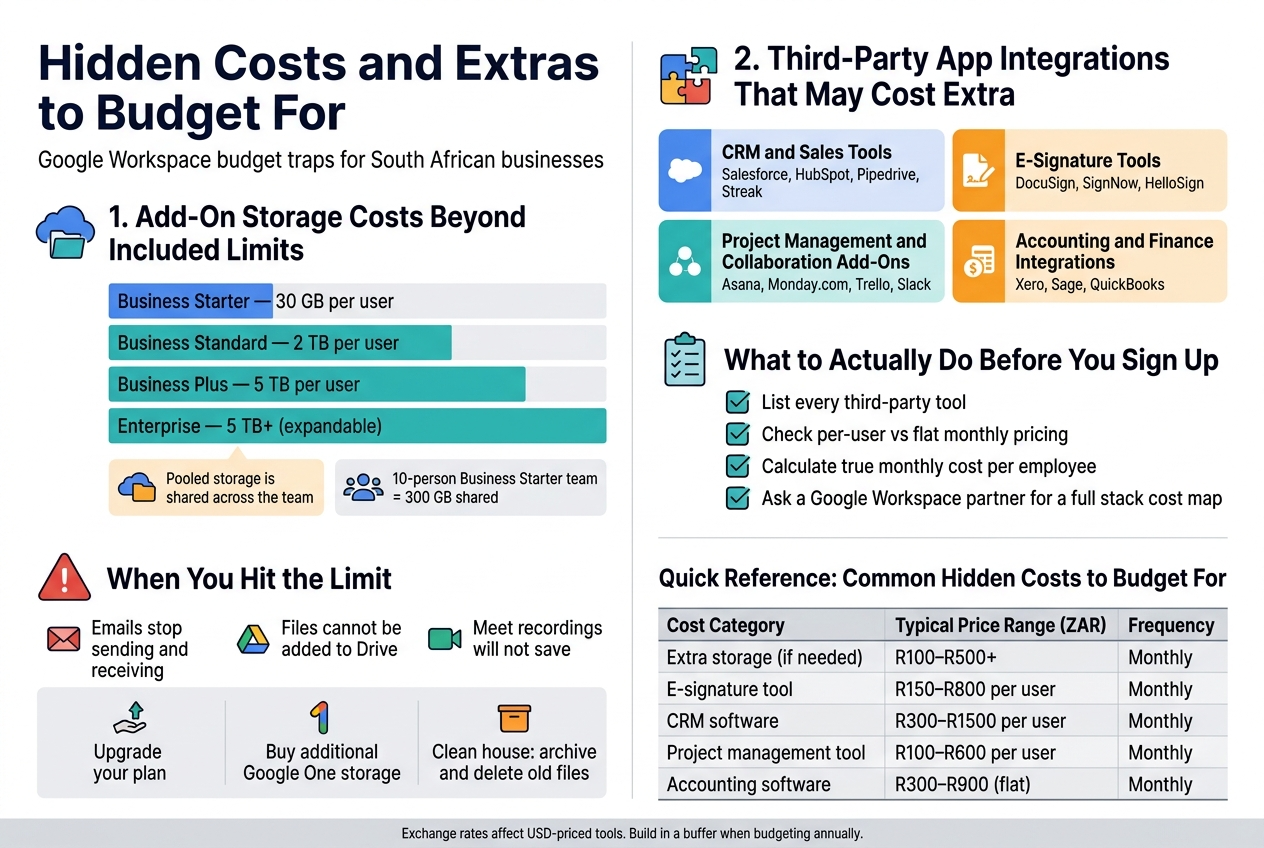
Add-On Storage Costs Beyond Included Limits
Storage is one of the sneakiest places where Google Workspace costs can creep up on you — especially if you’re running a growing business in South Africa with lots of files, emails, and shared drives piling up.
Here’s what each plan gives you out of the box:
| Plan | Pooled Storage Per User |
|---|---|
| Business Starter | 30 GB per user |
| Business Standard | 2 TB per user |
| Business Plus | 5 TB per user |
| Enterprise | 5 TB+ (expandable) |
The pooled storage model means your team shares a combined total. A 10-person Business Starter team shares 300 GB across everyone — which sounds fine until your sales team starts saving large video presentations and your finance department archives years of emails.
When You Hit the Limit
Once your storage fills up, users can’t send or receive emails, can’t add files to Drive, and Meet recordings won’t save. This can grind operations to a halt fast.
Your options at that point:
- Upgrade your plan — moving from Starter to Standard gives you a massive jump in storage and is often worth the extra cost per user
- Buy additional Google One storage — Google does offer additional pooled storage add-ons, but these are priced in USD, meaning the ZAR cost fluctuates with the exchange rate
- Clean house — regularly archiving or deleting old files and emptying Trash can buy you time, but it’s not a long-term solution
If your business handles large media files, engineering drawings, or long video recordings, Business Starter is almost certainly undersized. You’ll likely end up paying more in storage add-ons than the cost difference between plans — so it makes more sense to start on Business Standard.
Tips to Manage Storage Costs
- Audit your shared drives quarterly to remove duplicates and outdated files
- Set clear file management policies for your team early on
- Check Google Workspace Admin Console regularly to see which users are consuming the most storage
- Use Google Vault (included in Business Plus and Enterprise) to archive rather than store everything in active Drive
Third-Party App Integrations That May Cost Extra
Google Workspace plays well with hundreds of third-party apps, and the Google Workspace Marketplace is packed with tools that can extend what you can do. The problem is that “integrates with Google Workspace” doesn’t always mean “free.”
Here are some common categories where South African businesses get caught off guard:
CRM and Sales Tools
Apps like Salesforce, HubSpot, and Pipedrive all integrate with Gmail, Google Calendar, and Drive — but they come with their own subscription fees. If you’re paying R350 per user per month for Workspace and then adding a CRM at R600+ per user on top, your total cost per employee can double quickly.
Some lighter CRM options like Streak are built directly inside Gmail and have a free tier, but the paid versions still add to your monthly bill.
E-Signature Tools
Google Workspace doesn’t include a native e-signature solution (Google is working on Google Docs-based signing for some tiers, but it’s limited). If your business regularly signs contracts, you’ll likely need:
- DocuSign — industry standard, but priced in USD
- SignNow or HelloSign — more affordable alternatives, still an additional monthly cost
For a South African SME closing deals regularly, e-signature tools are practically essential, so budget for this from day one.
Project Management and Collaboration Add-Ons
Google Workspace includes Tasks and Keep for basic task management, but they’re fairly basic. Many teams add:
- Asana, Monday.com, or Trello — these integrate with Google Calendar and Drive but cost extra
- Slack — some businesses run Slack alongside Google Chat, which means paying for two communication platforms (and creating confusion)
If your team needs serious project management, check whether the tools you’re considering charge per user — costs can add up fast across a larger team.
Accounting and Finance Integrations
Tools like Xero, Sage, and QuickBooks all integrate with Google Workspace in some way, but they’re standalone subscriptions. Xero, for example, starts at around R300–R500/month depending on the plan — and that’s before you factor in Workspace itself.
What to Actually Do Before You Sign Up
- List every third-party tool your business currently uses or plans to use
- Check which ones charge per user vs. flat monthly rates
- Calculate your true monthly cost per employee — Workspace + CRM + e-sig + project management
- Ask your Google Workspace reseller or partner (like Othware, an official Google Partner in South Africa) to help you map out a full software stack cost before you commit
Working with a local partner like Othware means you get guidance on which Google Workspace plan genuinely fits your workflow — and which add-ons are actually necessary vs. nice-to-have. That kind of advice can save a small business thousands of rands a year.
Quick Reference: Common Hidden Costs to Budget For
| Cost Category | Typical Price Range (ZAR) | Frequency |
|---|---|---|
| Extra storage (if needed) | R100–R500+ | Monthly |
| E-signature tool | R150–R800 per user | Monthly |
| CRM software | R300–R1500 per user | Monthly |
| Project management tool | R100–R600 per user | Monthly |
| Accounting software | R300–R900 (flat) | Monthly |
These numbers vary, and rand/dollar exchange rates affect anything priced in USD. Always convert at the current rate and build in a buffer for exchange rate movement when budgeting annually.
How to Get the Best Google Workspace Deal in South Africa
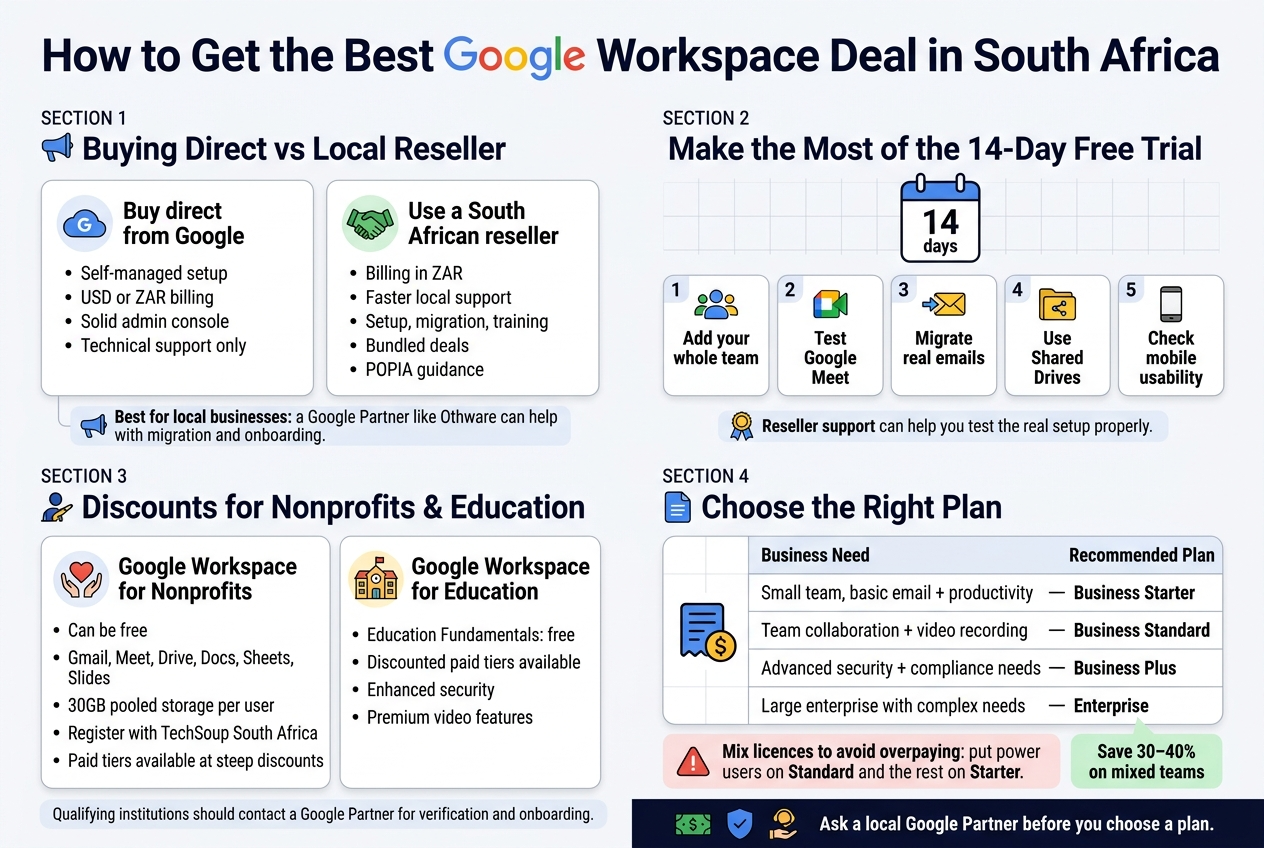
Buying Direct from Google vs Using a Local Reseller
You’ve got two routes when buying Google Workspace in South Africa: go straight to Google or work through a local reseller. Both have their place, and the right choice depends on what kind of support you actually need.
Buying direct from Google makes sense if you’re comfortable managing your own setup, don’t need hand-holding, and want the most straightforward billing in USD or ZAR directly from the source. Google’s admin console is solid, and their support is decent for technical issues.
Using a South African reseller — like Othware, a certified Google Partner — often makes more sense for local businesses. Here’s why:
- Local billing in ZAR with no surprise currency conversion charges
- Faster, localised support from people who understand the South African business environment
- Help with setup, migration, and training that Google itself won’t provide
- Bundled deals that sometimes include additional services or better pricing tiers
- Compliance guidance relevant to POPIA and local data requirements
For small businesses in South Africa that are switching from a legacy email setup or Microsoft 365, having a local partner walk you through the migration is worth a lot more than saving a few rand on the monthly rate.
Taking Advantage of Free Trials Before Committing
Google offers a 14-day free trial on most Workspace plans, and you’d be doing yourself a disservice not to use it properly. Many businesses sign up, glance at Gmail and Drive, and then either commit or cancel without really stress-testing the platform.
Here’s how to get real value from the trial period:
- Add your whole team — don’t just test it yourself. How your staff adapts to Meet, Chat, and Docs matters more than your personal preference.
- Test Google Meet for video calls — check call quality, screen sharing, and recording features against what you currently use.
- Try migrating a few real emails from your existing system to see how the process works before you’re locked in.
- Use Shared Drives if you’re on Business Standard or above — this is one of Workspace’s biggest selling points for teams.
- Check mobile usability — most South African businesses have staff working on phones, and the Gmail and Drive mobile apps are genuinely good, but test your specific use case.
If you work through a reseller like Othware, you may get extended trial support or help configuring the environment properly during the trial so you’re testing the real product, not a half-set-up version.
Discounts Available for Nonprofits and Educational Institutions
South African nonprofits and schools can access Google Workspace at dramatically reduced rates — sometimes free. This is one of the most underused benefits in the local market.
Google Workspace for Nonprofits
Qualifying registered NPOs can get Google Workspace for Nonprofits at no cost. This includes:
- Gmail with a custom domain
- Google Meet, Drive, Docs, Sheets, Slides
- 30GB pooled storage per user (on the base tier)
To qualify, your organisation needs to be registered with TechSoup South Africa and meet Google’s nonprofit eligibility criteria. The application process takes a bit of admin, but the saving is massive for organisations running on tight budgets.
Upgraded nonprofit plans (Business Standard and Business Plus equivalents) are also available at steep discounts if you need more storage or features like recorded Meet sessions.
Google Workspace for Education
South African schools, universities, and educational institutions can access Google Workspace for Education Fundamentals completely free. Paid tiers (Education Standard, Teaching & Learning Upgrade, Education Plus) are available at reduced rates for institutions that need more advanced features like enhanced security and premium video capabilities.
If you’re running an institution that qualifies, don’t pay standard pricing — reach out to a Google Partner like Othware who can help with the verification and onboarding process.
Tips for Choosing the Right Plan to Avoid Overpaying
Picking the wrong plan is one of the most common ways South African businesses waste money on Google Workspace. Here’s how to match the plan to your actual needs:
| Business Need | Recommended Plan |
|---|---|
| Small team, basic email + productivity | Business Starter |
| Team collaboration + video recording | Business Standard |
| Advanced security + compliance needs | Business Plus |
| Large enterprise with complex needs | Enterprise |
Practical questions to ask before choosing:
- How many users do you have? Pricing is per user, so even a R50 difference per seat adds up fast at 20+ users.
- Do you actually need recorded meetings? Recording is only available from Business Standard up. If you don’t need it, don’t pay for it.
- How much storage do people really use? Business Starter gives 30GB per user. Most small teams never hit this limit unless they’re storing large video files.
- Are you paying for features you could get free elsewhere? Tools like Google Forms, Sites, and Jamboard come with all plans — make sure you’re not duplicating costs with third-party tools.
One trap to avoid: Upgrading everyone to Business Standard when only your management team needs video recording. Google allows you to mix licences — put power users on Standard and give the rest of the team Starter licences. This alone can cut your monthly Google Workspace cost in South Africa by 30–40% for mixed teams.
If you’re unsure which plan fits, a quick conversation with a local Google Partner can save you from over-speccing and overpaying from day one.
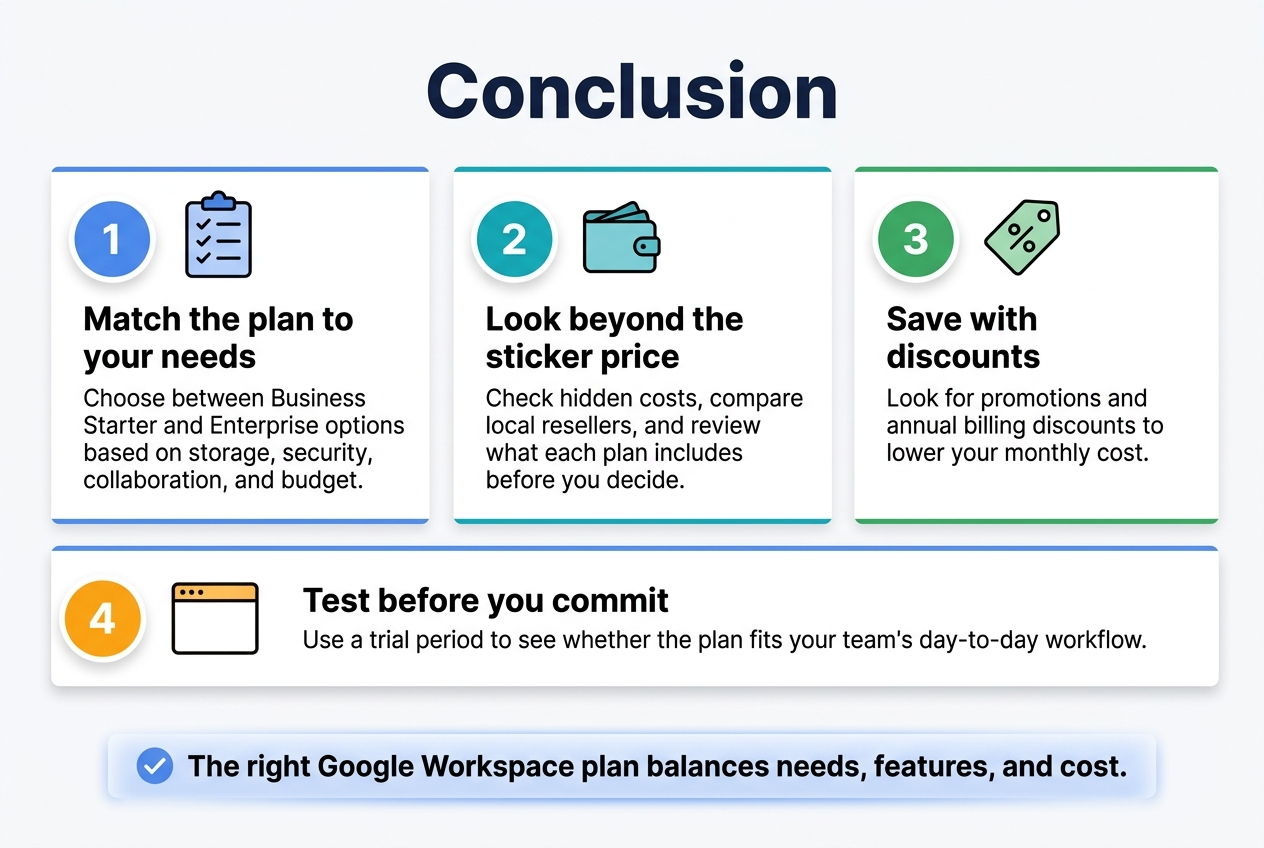
Getting the right Google Workspace plan in South Africa comes down to knowing exactly what your business needs and what you’re willing to spend. From the basic Business Starter plan to the more feature-packed Enterprise options, there’s something for every type of team and budget. The key is to match the storage, security features, and collaboration tools to your actual day-to-day requirements rather than just grabbing the cheapest option available.
Before you commit, take a good look at the hidden costs, compare what local resellers are offering, and check if any promotions or annual billing discounts can save you some cash. A little research upfront can make a big difference to your monthly bottom line. If you’re still on the fence, most plans come with a trial period, so there’s no reason not to test things out before locking in a subscription.