
Google Workspace License Cost in South Africa: Starter vs Standard vs Plus
If you’re running a business in South Africa and trying to figure out which Google Workspace plan actually makes sense for your budget, you’re in the right place. This guide is for small business owners, IT managers, and team leads who want a straight answer — no jargon, no runaround.
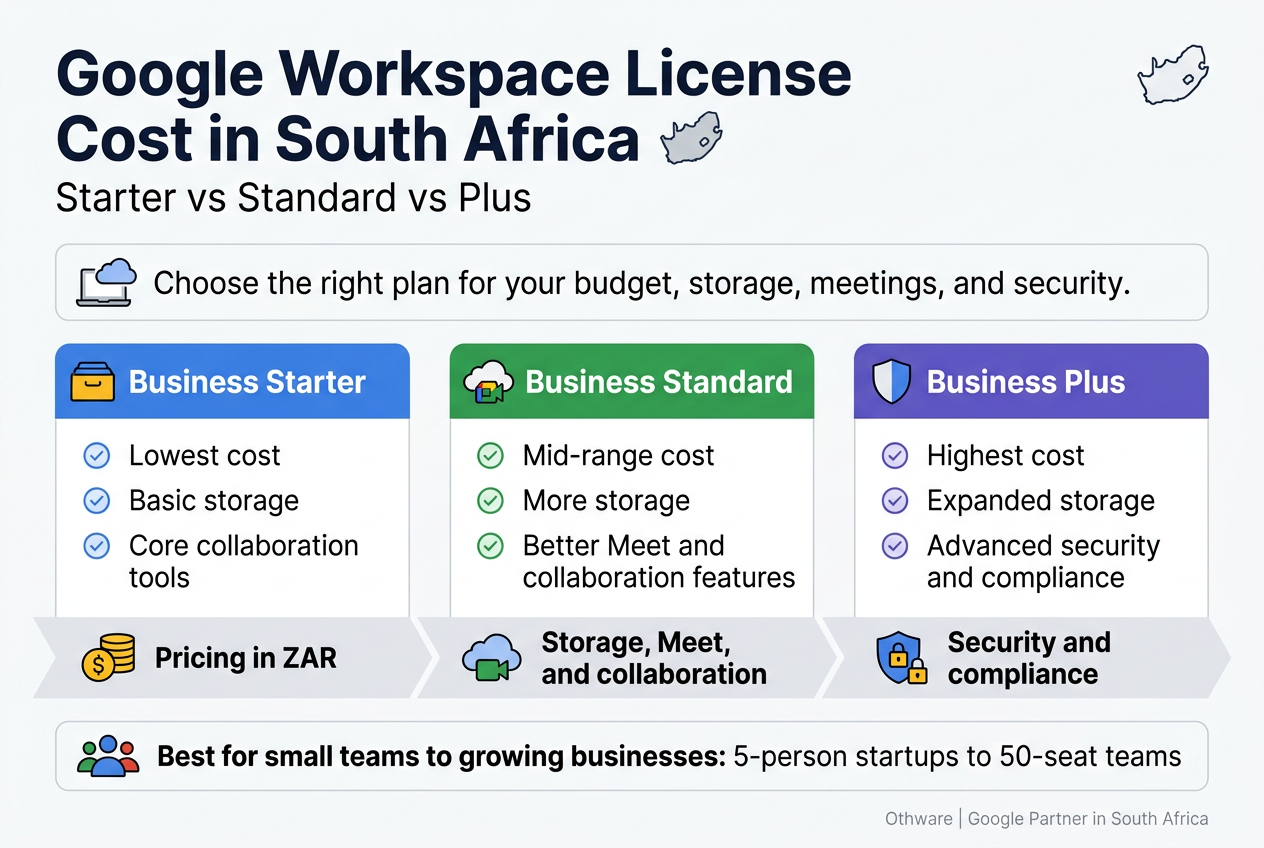
Google Workspace pricing in South Africa is billed in ZAR, and the difference between Business Starter, Standard, and Plus goes way beyond just storage. We’ll break down exactly what each plan costs, what you get for that money, and where the real gaps are between the tiers.
Here’s what we’re covering:
- Real Google Workspace plans ZAR pricing so you can compare costs side by side
- Storage, Meet, and collaboration features — because that’s where the plans actually start to differ
- Security and compliance tools that matter more as your team grows
Whether you have a five-person startup or a 50-seat team, picking the wrong plan means either overpaying or running into walls fast. Othware, a Google Partner for South Africa, works with local businesses on this exact decision every day — so the insights here come from real-world experience, not a spec sheet.
Let’s get into it.
Understanding Google Workspace Plans Available in South Africa
What Business Starter Offers for Small Teams
Google Workspace Business Starter is the entry point for South African businesses that want professional Google tools without a hefty price tag. It is designed with small teams in mind — think a startup with five people, a law firm with a handful of staff, or a growing e-commerce operation that needs reliable email and file sharing without paying for features they will never touch.
At its core, Business Starter gives every user a custom Gmail address tied to your business domain. So instead of sending proposals from a Gmail.com address, your team communicates from @yourcompany.co.za — which alone makes a strong impression on clients and partners. South African businesses operating in competitive sectors like professional services, retail, or consulting know how much that perception matters.
Each user on Business Starter gets 30 GB of pooled cloud storage across Gmail, Google Drive, and Google Photos. For a small team handling documents, spreadsheets, and presentations, 30 GB per user is workable — especially when you consider that most Google Docs, Sheets, and Slides files do not count against storage at all. Only uploaded files like PDFs, images, and videos eat into that quota.
Other key features in this plan include:
- Google Meet video calls with up to 100 participants and a 60-minute cap per meeting
- Google Chat for team messaging and file sharing
- Google Docs, Sheets, Slides, Forms, and Sites with real-time collaboration
- Shared Calendars for scheduling and visibility across your team
- Google Vault is not included in this plan, which is something larger or compliance-heavy businesses need to keep in mind
- Standard security features including two-step verification and admin controls through the Google Admin Console
For a small South African business just getting started with a professional cloud environment, Business Starter delivers strong value. The Google Workspace pricing in South Africa for this plan makes it one of the most affordable ways to move your team off personal email accounts and onto a unified, secure, and scalable platform. If your team is small, your file sizes are manageable, and you do not need advanced compliance tools, this plan handles day-to-day business operations well.
What Business Standard Adds for Growing Companies
When a business starts scaling, Business Starter’s limitations become noticeable. Meeting durations get stretched, shared drives fill up faster, and teams need better tools for collaboration and recording important calls. That is exactly where Business Standard steps in.
Business Standard keeps everything from Starter and layers on a set of features that growing South African companies genuinely need.
The most talked-about upgrade is storage — Business Standard gives each user 2 TB of pooled storage, which is a massive jump from the 30 GB in Starter. If your team regularly works with large design files, video content, client presentations, or data-heavy spreadsheets, this difference is felt almost immediately.
Google Meet also gets a significant boost:
- Meeting capacity jumps to 150 participants
- The 60-minute cap is lifted — meetings can run for as long as needed
- Meeting recordings are available and automatically saved to Google Drive
- Noise cancellation is enabled, which is genuinely useful in noisy South African office environments or when team members are working from home with background noise
- Polls and Q&A features in Google Meet make team and client meetings more interactive
For businesses that run regular training sessions, client webinars, or all-hands meetings, the recording feature alone justifies the upgrade. There is real value in being able to revisit a strategic discussion or share a recorded training session with someone who missed the live call.
Business Standard also includes:
- Shared drives (also called Team Drives) where files belong to the organisation, not an individual — critical for continuity when staff members leave
- Approval workflows in Google Drive for document sign-offs
- eSignature capabilities for Google Docs (currently available to eligible Workspace users)
For South African businesses in sectors like real estate, financial services, marketing agencies, or tech companies with distributed teams, Business Standard strikes a strong balance between cost and functionality. It gives you enough room to grow without jumping straight into the more advanced features of Business Plus.
If you are evaluating Google Workspace plans in ZAR and wondering where the real value jump is, Business Standard is frequently the sweet spot for companies with 10 to 100 users who need reliable collaboration, more storage, and better meeting tools.
What Business Plus Delivers for Larger Organisations
Business Plus is Google Workspace’s most complete offering before you step into Enterprise territory. It is built for organisations that have moved well past the startup phase and are operating with complexity — larger teams, compliance requirements, and a need for deeper visibility into what is happening across the business.
The storage allocation jumps again to 5 TB per user, which accommodates even the most data-intensive teams. Legal firms managing large case files, engineering companies storing technical drawings, or media production teams working with high-resolution content will feel the difference.
Google Meet gets further upgrades at this level:
- Meeting capacity increases to 500 participants
- Attendance tracking is built in, so you have a record of who joined a session — useful for training compliance, HR meetings, or board-level calls
- In-domain live streaming allows you to broadcast meetings to a larger internal audience without everyone needing a seat in the actual call
But the headline features of Business Plus are arguably in the security and compliance space:
- Google Vault is included, which provides eDiscovery, archiving, and audit capabilities — something that regulated industries in South Africa genuinely require
- Advanced endpoint management gives your IT team or admin finer control over which devices access company data
- Enhanced security reporting through the Admin Console helps administrators spot suspicious activity before it becomes a problem
For South African businesses operating in industries like healthcare, financial services, legal, or government-adjacent sectors where data governance matters, Business Plus provides tools that are not just convenient — they are necessary. Google Vault, in particular, gives legal and compliance teams the ability to search, hold, and export data across Gmail and Drive, which becomes critical if your organisation ever faces litigation or a regulatory audit.
Other notable features at this level include:
- AppSheet Core is included for no-code app building on top of your Google Sheets and Drive data
- Better audit logs with longer data retention periods
- Access to advanced admin controls across the full Google Workspace environment
The Google Workspace Business Plus features are a solid fit for organisations with 50 to 500 users where security, compliance, and scalability are not optional extras — they are baseline requirements. If you are working with a Google partner for South Africa like Othware, they can help you evaluate whether Business Plus aligns with your compliance obligations before you commit to a licensing structure.
Which Industries Benefit Most from Each Plan
Not every business needs the same tool, and Google Workspace’s tiered structure reflects that. Here is a practical breakdown of which industries in South Africa tend to gravitate toward each plan and why.
Business Starter — Best For
| Industry | Why Starter Works |
|---|---|
| Freelancers & sole proprietors | Low cost, professional email, basic collaboration |
| Early-stage startups | Affordable per-user pricing, easy to scale up later |
| Small retail businesses | Basic Drive storage, Gmail, and Sheets for operations |
| Non-profit organisations | Cost-conscious, needs professional tools without complexity |
| Small professional services firms | Clean email, Docs, and Calendar integration |
Small teams in South Africa often use Business Starter as a launching pad. The Google Workspace license cost for South Africa at this tier is accessible, and it gives businesses a credible digital foundation without over-investing early on.
Business Standard — Best For
| Industry | Why Standard Fits |
|---|---|
| Marketing and creative agencies | Large files, collaboration, recorded client meetings |
| Property and real estate companies | Shared drives, long meetings, document approvals |
| IT and software companies | Team collaboration, shared drives, scalable storage |
| Accounting and consulting firms | Recorded client sessions, shared file management |
| Educational institutions and training providers | Meeting recordings, larger participant counts, noise cancellation |
Business Standard is the plan that growing South African companies reach for when they outgrow Starter. The combination of expanded storage, meeting recordings, and shared drives addresses the three most common pain points teams hit when scaling up.
Business Plus — Best For
| Industry | Why Plus Is the Right Call |
|---|---|
| Legal firms and attorneys | Vault for eDiscovery, compliance archiving, endpoint management |
| Financial services and insurance | Audit logs, data retention, advanced security controls |
| Healthcare providers | Compliance requirements, secure data management |
| Medium to large enterprises (50–500 staff) | 500-person meetings, attendance tracking, advanced admin |
| Government-adjacent organisations | Data governance, Vault, endpoint controls |
For South African businesses in regulated industries, the jump to Business Plus is less about wanting extra features and more about needing to meet legal and compliance standards. Google Vault alone changes the risk profile of how your organisation manages communications and documents.
Key Differences at a Glance
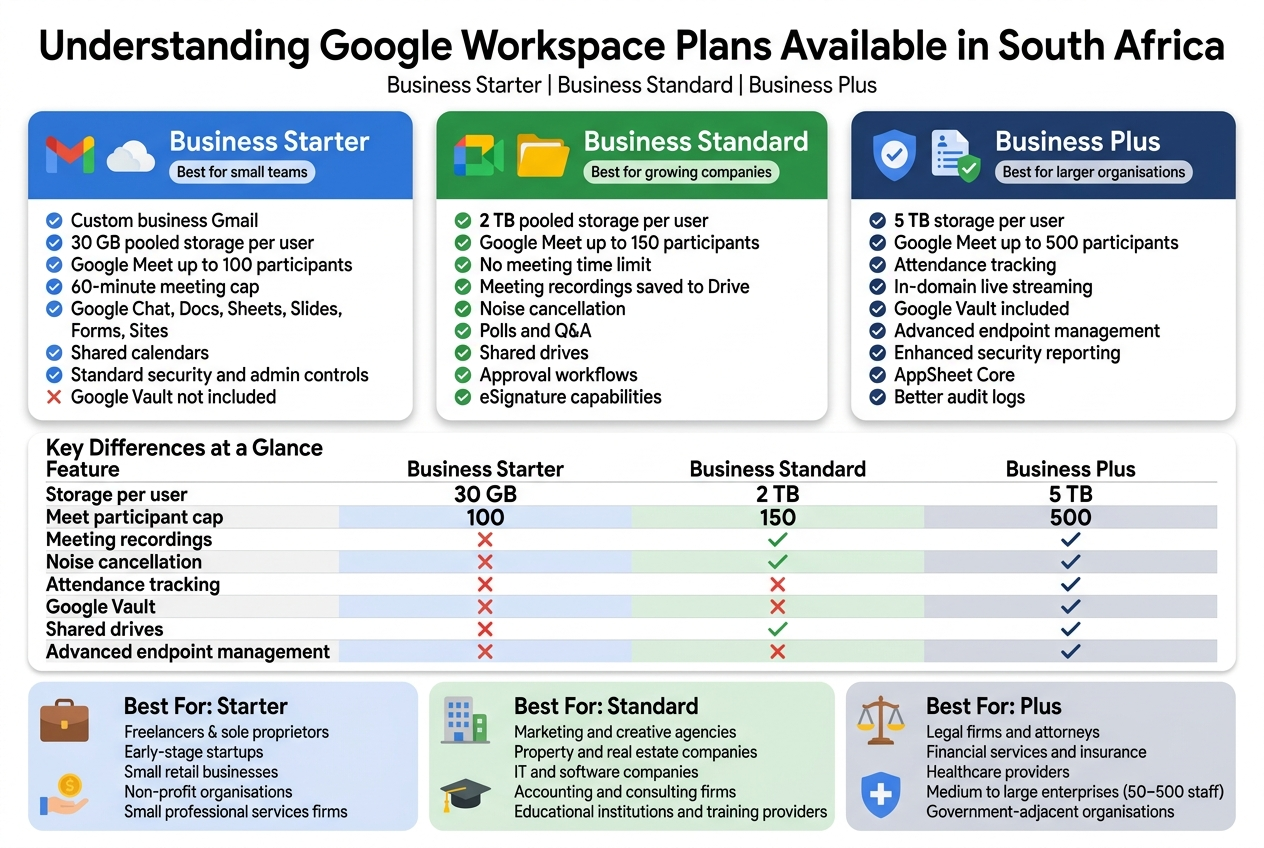
| Feature | Business Starter | Business Standard | Business Plus |
|---|---|---|---|
| Storage per user | 30 GB | 2 TB | 5 TB |
| Meet participant cap | 100 | 150 | 500 |
| Meeting recordings | ✗ | ✓ | ✓ |
| Noise cancellation | ✗ | ✓ | ✓ |
| Attendance tracking | ✗ | ✗ | ✓ |
| Google Vault | ✗ | ✗ | ✓ |
| Shared drives | ✗ | ✓ | ✓ |
| Advanced endpoint management | ✗ | ✗ | ✓ |
Understanding which plan aligns with your industry, team size, and compliance requirements is the first real step toward choosing the right Google Workspace plan for your South African business. The cost difference between plans is real, but so is the cost of being under-equipped for how your business actually operates.
Google Workspace Pricing in South African Rands
Current Monthly Cost per User for Starter
Google Workspace Business Starter is the entry-level plan, and for South African businesses, it sits at the most accessible price point in the lineup. As of 2024, the pricing comes in at approximately R99 to R115 per user per month depending on your billing cycle and the current USD/ZAR exchange rate applied at the time of your billing.
Google bills its Workspace plans in US dollars — the base price for Business Starter is $6 USD per user per month on an annual commitment. What you actually pay in rands depends entirely on what the rand is doing against the dollar on the day your invoice is generated. More on that in a moment.
For a small South African business running a team of five, you’re looking at roughly R495 to R575 per month for the entire team. That gets you custom Gmail on your own domain, 30 GB of pooled storage per user, Google Meet video calls, and access to the full Google Workspace productivity suite including Docs, Sheets, Slides, Drive, and Calendar. For startups and lean operations, this is a genuinely usable setup at a price that doesn’t break the bank.
The Starter plan is billed through Google directly or through an authorised reseller like Othware, a Google Partner operating in South Africa. Buying through a local partner can sometimes give you access to ZAR-denominated invoicing, local support, and consolidated billing — all things that matter when you’re running a South African business and need proper VAT invoices in rands.
Current Monthly Cost per User for Standard
Business Standard steps things up in a meaningful way, and the price reflects that. The base price is $12 USD per user per month on an annual plan, which translates to roughly R200 to R230 per user per month in South African rands, again depending on exchange rate conditions at billing time.
For a five-person team, that’s approximately R1,000 to R1,150 per month. Compared to Starter, you’re paying nearly double per user, but what you get in return is a significant jump — most notably in storage and Google Meet capabilities.
The storage upgrade alone can justify the switch for businesses that work heavily with files, video recordings, or large email volumes. Standard gives each user 2 TB of pooled cloud storage, compared to just 30 GB on Starter. If your team is constantly hitting storage limits, getting annoying quota warnings, or needing to clean up Drive regularly, the cost of Standard quickly starts making sense.
For growing businesses in South Africa that run regular video meetings and need recordings saved to Drive, Standard is the sweet spot. You get Google Meet recordings, noise cancellation, and attendance tracking baked in — features that Starter simply doesn’t offer.
Current Monthly Cost per User for Plus
Business Plus is the premium tier before you jump into Enterprise territory, and the pricing matches its position. At $18 USD per user per month on annual billing, you’re looking at around R300 to R345 per user per month in rands.
A team of five on Plus comes to roughly R1,500 to R1,725 per month. That’s a noticeable investment, and it’s the plan that makes the most sense for businesses where compliance, security, and larger meeting capacity are genuine requirements — not nice-to-haves.
Business Plus takes storage up to 5 TB per user (pooled), supports Google Meet calls with up to 500 participants, and adds features like eDiscovery and audit tools that are critical for regulated industries. If your business operates in finance, legal, healthcare, or any sector where data governance matters, the jump to Plus can save you real headaches down the line.
For most small-to-medium South African businesses, though, Plus is more plan than they need. It’s worth a close look if you’re scaling fast, managing large teams on video, or operating in a compliance-heavy industry.
How Exchange Rates Affect Your Monthly Bill
This is the part that catches a lot of South African businesses off guard. Google prices its Workspace plans in US dollars, which means your monthly rand cost is not fixed — it moves with the exchange rate.
When the rand weakens against the dollar (which, if we’re honest, happens more often than the other way around), your Google Workspace bill in rands goes up even though you haven’t changed your plan or added users. When the rand strengthens, your bill comes down slightly.
Here’s a practical example of how this plays out across plans for a single user:
| Plan | USD Price/User/Month | At R18/$ | At R19/$ | At R20/$ |
|---|---|---|---|---|
| Business Starter | $6 | R108 | R114 | R120 |
| Business Standard | $12 | R216 | R228 | R240 |
| Business Plus | $18 | R324 | R342 | R360 |
As you can see, even a R1 move in the exchange rate can shift your costs meaningfully across a team, especially as headcount grows.
For a team of 20 users on Business Standard, the difference between billing at R18/$ versus R20/$ is:
- At R18/$: R216 x 20 = R4,320/month
- At R20/$: R240 x 20 = R4,800/month
That’s a R480/month swing — or nearly R5,760 per year — without anything about your usage changing at all. Budget accordingly.
How to manage exchange rate exposure:
- Use a local Google Partner like Othware — resellers can sometimes offer ZAR-denominated contracts that give you predictable monthly billing without currency risk built into every invoice
- Monitor your annual renewal date — if you’re on annual billing, your rate gets locked at renewal, so the exchange rate at that point is what sets your costs for the next 12 months
- Factor in VAT — Google adds 15% South African VAT to its invoices, so whatever the rand-converted figure is, add another 15% to get your true all-in monthly cost
Annual vs Monthly Billing Savings Breakdown
Google Workspace gives you the choice between monthly and annual billing, and the difference in cost is significant enough that most businesses should default to annual unless cash flow is a genuine concern.
Here’s how the two options compare at the official Google USD pricing:
| Plan | Monthly Billing (USD) | Annual Billing (USD/Month) | Annual Savings Per User Per Year |
|---|---|---|---|
| Business Starter | $7.20/user/month | $6.00/user/month | $14.40 (~R259) |
| Business Standard | $14.40/user/month | $12.00/user/month | $28.80 (~R518) |
| Business Plus | $21.60/user/month | $18.00/user/month | $43.20 (~R778) |
(Savings calculated at approximately R18/$ — adjust based on current rate)
For a 10-user team, the annual savings look like this:
| Plan | Monthly Billing (Annual Cost) | Annual Billing (Annual Cost) | Total Annual Savings |
|---|---|---|---|
| Business Starter | R15,552 | R12,960 | R2,592 |
| Business Standard | R31,104 | R25,920 | R5,184 |
| Business Plus | R46,656 | R38,880 | R7,776 |
(Based on approximate R18/$ rate for illustration)
The savings on annual billing represent roughly a 17% discount across all plans. For a 20-user team on Business Standard, choosing annual over monthly billing saves you somewhere in the region of R10,000 per year — that’s real money that could go toward other parts of your business.
What to consider before committing to annual billing:
- Team size stability — if you’re adding staff regularly, you may end up paying for seats you haven’t filled yet. With annual billing, you commit upfront or pay for additions as they happen.
- Cash flow — some smaller South African businesses prefer the predictability of paying monthly even at a higher per-user rate, simply because it aligns better with their cash flow cycle.
- Trial periods — if you’re new to Google Workspace, it’s worth testing with monthly billing for a month or two before locking into a full year. Once you’re confident the plan fits, switch to annual and bank the savings.
- Reseller invoicing — working with a local Google Partner like Othware may give you more flexibility around payment terms and billing structure than going directly through Google’s self-serve portal.
A Quick Note on Google Workspace License Costs for South African Businesses
When you’re budgeting for Google Workspace licenses in South Africa, the smartest approach is to calculate your costs at a slightly weaker rand than the current rate — say R1 to R2 worse than today’s rate. This gives you a built-in buffer against rand depreciation and means your annual budget won’t get blindsided by currency movement.
For example, if you’re planning a team of 15 users on Business Standard for the coming financial year:
- Conservative estimate (at R20/$): R240 x 15 users x 12 months = R43,200/year (before VAT)
- Add 15% VAT: R43,200 x 1.15 = R49,680/year all-in
Planning at R20/$ when the current rate is R18.50/$ gives you a R2,700 annual buffer that covers exchange rate movement — and if the rand holds steady, you’ll simply come in under budget.
Storage and Gmail Features Compared Across Plans
Pooled Storage Limits and What They Mean for Your Team
Storage is one of those things nobody thinks about until the day someone can’t send an email because their inbox is full, or a shared Drive folder hits a wall right before a client deadline. Getting the storage question right before you commit to a Google Workspace plan saves a lot of headaches down the road — especially for South African businesses that are increasingly relying on cloud-based document collaboration and video file sharing.
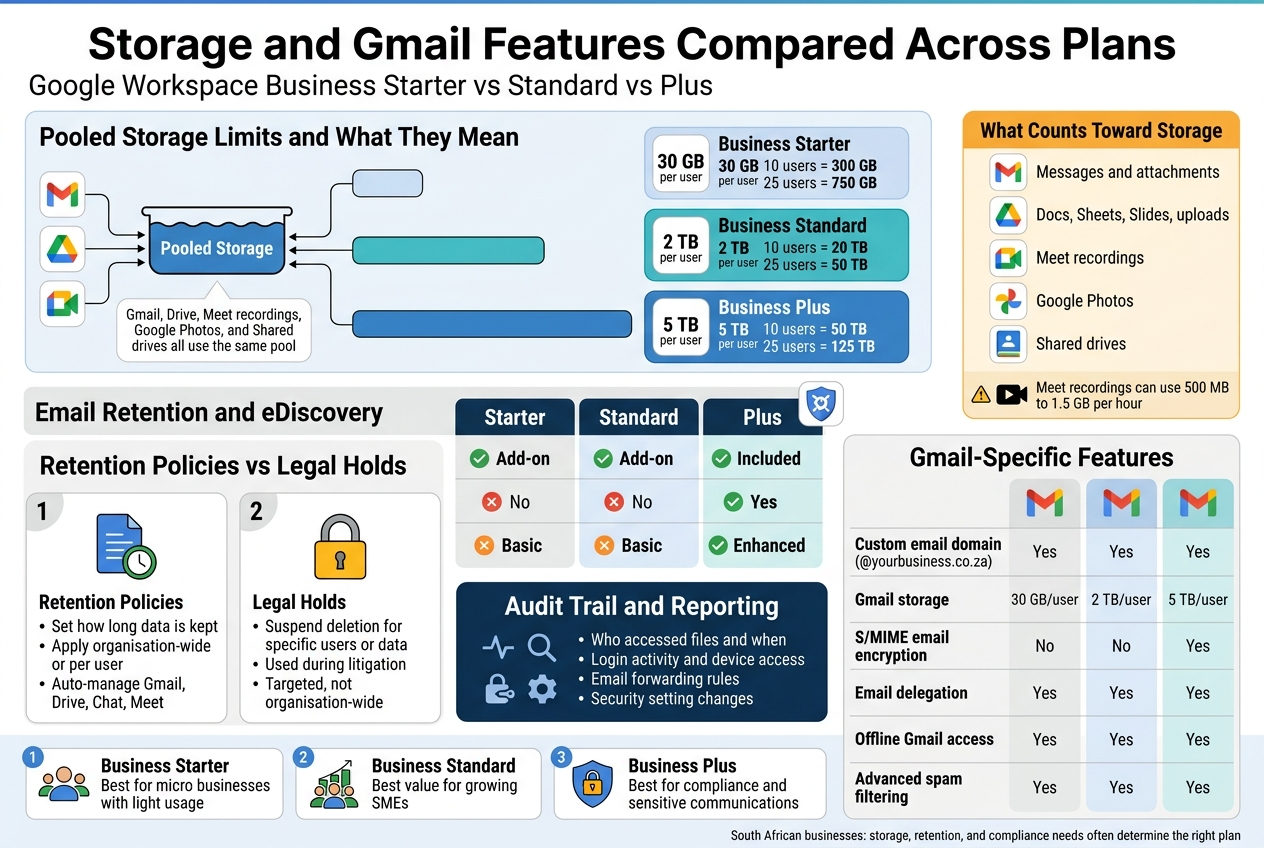
Google Workspace uses a pooled storage model across all its Business plans. This is a fundamentally different approach from the old per-user storage buckets that Google used to run. Instead of each user having their own fixed cap that they can’t share with anyone else, pooled storage works like a communal reservoir — all the storage across your organisation sits in one pot, and anyone on the team can draw from it as needed.
Here’s why that matters in practice: imagine you have a team of 10 people. Your marketing manager stores large video files and presentation assets, regularly using 40–50 GB. Your accounts team barely touches Drive and mostly lives in Gmail, using perhaps 5 GB per person. With individual storage caps, the marketer is constantly bumping into limits while accountants have unused space sitting idle. With pooled storage, the marketer draws more from the shared pool without anyone needing to upgrade individual plans. It’s a much more flexible and practical setup.
How Much Pooled Storage Do You Get Per Plan?
| Plan | Pooled Storage Per User | Example: 10 Users | Example: 25 Users |
|---|---|---|---|
| Business Starter | 30 GB | 300 GB total | 750 GB total |
| Business Standard | 2 TB | 20 TB total | 50 TB total |
| Business Plus | 5 TB | 50 TB total | 125 TB total |
The jump from Starter to Standard is enormous. 30 GB per user sounds reasonable on paper until you account for Gmail storage eating into the same pool — every email with attachments, every Drive file, every Meet recording stored in Drive, all comes out of that same 30 GB per user. For a small team doing light document work and sending mostly text emails, it can work. But the moment you start sharing PDFs, design files, or recorded video calls, Business Starter’s storage feels cramped fast.
Business Standard’s 2 TB per user is where things start to feel genuinely comfortable for most South African SMEs. A 25-person team on Standard gets 50 TB of pooled storage, which covers almost every realistic use case short of a media production company storing raw video footage in the cloud.
Business Plus at 5 TB per user is typically overkill for storage purposes alone — most teams that move to Plus are doing it for the compliance, security, and Meet features rather than the raw storage numbers. That said, organisations dealing with large volumes of files, scanned documents, or archived data will appreciate having the headroom.
What Counts Towards Your Storage Pool?
A common misconception is that Drive storage is separate from Gmail storage. It isn’t. Your pooled storage covers:
- Gmail messages and attachments across all users
- Google Drive files including Docs, Sheets, Slides, and any uploaded files
- Google Meet recordings saved to Drive
- Google Photos content linked to your Workspace account
- Shared drives your organisation owns
One thing that often catches teams off guard is Google Meet recordings. If you have regular team meetings, client calls, or webinars being recorded and saved to Drive, those files stack up quickly. A one-hour video recording at standard quality can run between 500 MB and 1.5 GB. Run ten of those a week across your team and you’ll burn through a Starter plan’s storage budget faster than you’d expect.
Practical Storage Guidance for South African Businesses
- Micro businesses (1–5 users) with light usage: Business Starter’s 30 GB per user (150 GB total) may work if you’re primarily using Docs and Sheets and keeping Gmail lean.
- Growing SMEs (10–50 users) with active collaboration: Business Standard is almost always the right call. The storage difference alone justifies the upgrade cost.
- Larger organisations or data-heavy teams: Business Plus gives you room to grow without needing to constantly monitor usage or buy additional storage top-ups.
Google does allow you to purchase additional storage if you exceed your pooled cap, but it adds complexity and ongoing cost. It’s usually cleaner to be on the right plan from the start than to manage top-ups on a Starter subscription.
Email Retention and eDiscovery Capabilities by Tier
For many South African businesses, the decision between Google Workspace plans comes down to a very practical question: what happens to your email data, and can you find it again when you need to?
This becomes especially relevant for businesses in regulated industries — financial services, legal, healthcare, and any organisation dealing with POPIA compliance requirements around data retention and access. But even outside regulated industries, the ability to search, recover, and audit email history is genuinely valuable operational infrastructure.
How Google Vault Fits Into the Picture
Google Vault is Google’s information governance and eDiscovery tool built into Workspace. It lets you set retention rules, place legal holds on specific users’ data, search across your organisation’s email and chat history, and export data for legal or compliance purposes.
Vault access is where the plans diverge significantly:
| Feature | Business Starter | Business Standard | Business Plus |
|---|---|---|---|
| Google Vault (Archiving & eDiscovery) | ❌ Not included | ❌ Not included | ✅ Included |
| Vault available as add-on | ✅ Yes, additional cost | ✅ Yes, additional cost | Built-in |
| Audit and reporting | Basic | Basic | Enhanced |
| Advanced eDiscovery | ❌ | ❌ | ✅ |
Business Starter and Business Standard users can purchase Vault as an add-on licence, but it’s priced per user and adds to your monthly costs. Business Plus includes Vault natively, which is one of the primary reasons compliance-conscious businesses move directly to Plus rather than starting at Standard.
What Email Retention Actually Means Day-to-Day
Email retention rules in Vault allow you to specify how long emails are kept before they’re permanently deleted — or alternatively, to ensure they’re kept indefinitely regardless of whether a user deletes them from their inbox.
This is critical for a few reasons:
- Legal disputes: If a contractual disagreement arises, being able to pull email records from 18 months ago can be the difference between winning and losing a case.
- POPIA compliance: South Africa’s Protection of Personal Information Act has specific requirements around data handling. Having auditable, retrievable email records supports your compliance posture.
- Staff transitions: When an employee leaves, their email data doesn’t vanish. You can retain and search it within the bounds of your retention policy.
- Regulatory audits: For financial services firms, auditors may request specific communications. Vault makes that search and export process manageable.
eDiscovery: Finding What You Need When You Need It
eDiscovery in Vault goes beyond simple email search. You can:
- Search across all users’ Gmail, Drive, and Chat data simultaneously
- Search by date range, sender, recipient, keywords, or subject line
- Place legal holds on specific accounts to prevent data deletion during litigation
- Export results in formats suitable for legal review (PST, MBOX, etc.)
For a small business owner who has never dealt with litigation or a regulatory audit, this can sound like overkill. And for many businesses, it genuinely is — Business Standard’s basic admin controls and Gmail search functionality are perfectly adequate for everyday needs.
But for organisations where email forms part of the evidentiary trail — accountants, attorneys, insurance brokers, investment advisors, healthcare administrators — the cost of not having Vault when you need it is almost always higher than the cost of the Plus plan that includes it.
Retention Policies vs. Legal Holds: Understanding the Difference
These two terms are often used interchangeably but they serve different purposes:
Retention Policies:
- Set rules about how long data is kept organisation-wide or per user
- Can apply to Gmail, Drive, Chat, Groups, and Meet recordings
- Automatically enforce data lifecycle management without manual intervention
- Available through Vault (Business Plus or Vault add-on)
Legal Holds:
- Suspend normal retention rules for specific users or data sets
- Ensure that data isn’t deleted even if a retention policy would normally remove it
- Used when litigation is anticipated or underway
- Targeted rather than organisation-wide
A well-designed retention strategy uses both. You might have a default retention policy that keeps email for five years and then auto-purges, while simultaneously placing a legal hold on a specific account involved in a dispute to ensure nothing is deleted regardless of that policy.
The Audit Trail and Reporting Layer
Business Plus also includes enhanced audit reporting within the Admin Console and Vault. Admins can track:
- Who accessed which files and when
- Login activity and device access patterns
- Email forwarding rules (useful for spotting potential data leakage)
- Changes to security settings and admin configurations
For South African businesses preparing for POPIA audits or simply wanting tighter visibility into how their data is being accessed and handled, this audit trail capability is one of the less-discussed but genuinely useful features of the Plus tier.
Gmail-Specific Features That Differ Across Plans
Beyond archiving and eDiscovery, there are a few Gmail-specific features worth comparing directly:
| Feature | Starter | Standard | Plus |
|---|---|---|---|
| Custom email domain (@yourbusiness.co.za) | ✅ | ✅ | ✅ |
| Gmail storage (part of pooled) | 30 GB/user | 2 TB/user | 5 TB/user |
| S/MIME email encryption | ❌ | ❌ | ✅ |
| Email delegation | ✅ | ✅ | ✅ |
| Offline Gmail access | ✅ | ✅ | ✅ |
| Advanced spam filtering | ✅ | ✅ | ✅ |
| Email routing and delivery rules | ✅ | ✅ | ✅ |
S/MIME encryption is the standout Gmail feature exclusive to Business Plus. S/MIME (Secure/Multipurpose Internet Mail Extensions) lets users send digitally signed and encrypted emails — meaning the content of an email can only be read by the intended recipient, and the recipient can verify the email genuinely came from who it says it came from. For industries handling sensitive client information, this is a meaningful security feature rather than a nice-to-have.
Making the Storage and Email Call for Your Business
When weighing up Google Workspace pricing in South Africa across the Starter, Standard, and Plus tiers, storage and email features often tip the decision:
- If your team is small, lean on document usage, and you’re not in a regulated industry, Business Starter can genuinely work — but monitor your storage usage from day one.
- If you’re a growing team that collaborates heavily on files, records meetings, or needs comfortable Gmail storage without constant admin overhead, Business Standard hits the sweet spot on value for most South African SMEs.
- If your business has compliance requirements, deals with sensitive client communications, or operates in a regulated sector where email audit trails and eDiscovery matter, Business Plus with its built-in Vault access is the appropriate choice — and trying to replicate those capabilities through add-ons on a lower tier usually ends up costing more anyway.
Working with a local Google Workspace partner like Othware, a recognised Google Partner for South Africa, can help you model your actual storage usage and compliance requirements against each plan’s cost in ZAR before committing — which often saves businesses from either under-speccing their plan or paying for features they’ll never use.
Google Meet and Collaboration Tools by Plan
Maximum Meeting Participant Limits per Plan
One of the biggest practical differences between Google Workspace plans comes down to how many people can actually join a meeting at the same time. If you are running a small team with five or six people huddled around a project, this might not feel like a pressing concern. But the moment you need to host a company-wide update, a client webinar, or a training session with your whole South African sales team dialled in from Cape Town to Johannesburg, participant limits become very real, very fast.
Here is how the three main plans stack up:
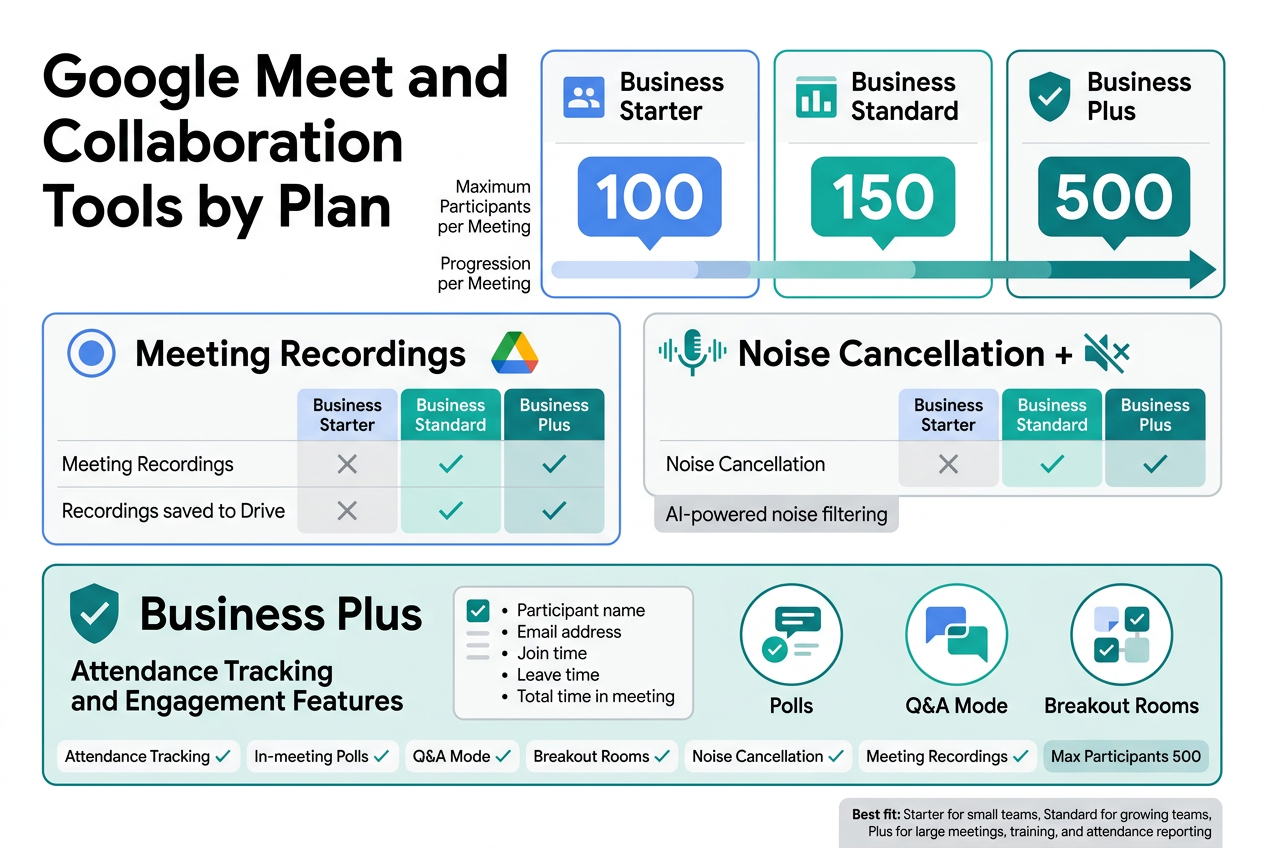
| Plan | Maximum Participants per Meeting |
|---|---|
| Business Starter | 100 participants |
| Business Standard | 150 participants |
| Business Plus | 500 participants |
Business Starter gives you 100 participants per call. For a startup or a small business with under 50 employees, this is perfectly fine for day-to-day meetings. You can hold team standups, client calls, interviews, and even small workshops without ever brushing against that ceiling.
Business Standard bumps things up to 150 participants. This middle-ground option suits growing businesses that are past the scrappy startup phase but not quite at the point of needing massive all-hands meetings. If your South African business has multiple departments that occasionally need to come together, Standard gives you the breathing room to do that comfortably.
Business Plus is where things open up significantly with 500 participants per meeting. This is the plan for businesses that host large-scale virtual events, regular company-wide briefings, external webinars, or training programmes where headcount can climb quickly. If you are managing a distributed workforce across multiple South African cities or working with large client groups, this limit matters enormously.
One thing worth keeping in mind when comparing Google Workspace plans in ZAR is that the cost difference between Standard and Plus is not just about storage or security extras — the jump in meeting capacity alone can justify the upgrade for certain businesses. If your team is constantly bumping against a 150-person ceiling, you are not just paying for Plus — you are solving a real operational problem.
Recording and Noise Cancellation Availability
Meeting recordings and noise cancellation are two features that sound like nice-to-haves right up until the moment you desperately need them. Then they suddenly feel absolutely essential.
Meeting Recordings
Recording functionality is available on Business Standard and Business Plus. It is not included in Business Starter at all.
Here is why this matters: in the South African business environment, where remote work has become standard across many industries, meeting recordings have shifted from a luxury to a genuine business tool. Teams across different time zones, employees who missed a critical update, compliance requirements, onboarding documentation — there are dozens of reasons why you might want to record a meeting and share it afterwards.
With Business Standard and Plus, recordings are saved directly to the host’s Google Drive. Sharing is straightforward — you send a link, just like any other Drive file. There is no third-party software required, no waiting for a recording to process on a separate platform, and no worrying about where the file ended up.
For businesses running on Business Starter, the absence of recording can be a genuine sticking point. If your team frequently needs to document decisions, share updates with absent colleagues, or build a library of training sessions, you will find yourself wishing you had upgraded. Many South African businesses using Starter find this to be the single feature that eventually pushes them toward Standard.
Noise Cancellation
Noise cancellation is available on Business Standard and Business Plus, and it is genuinely one of the most underrated features in the entire Google Workspace feature set.
South African offices are not always the quiet, controlled environments that video call etiquette assumes. Open-plan offices, load shedding-related generator noise, shared coworking spaces, home offices with kids or dogs in the background — these are real-world conditions that affect call quality every single day. Google Meet’s AI-powered noise cancellation filters out background sounds in real time, so your voice comes through clearly even when chaos is happening around you.
Business Starter users do not get this feature, which means background noise is a constant risk on calls. If your team is regularly working from environments that are less than perfectly quiet — and most South African teams are — this is a practical limitation worth considering when choosing between plans.
| Feature | Business Starter | Business Standard | Business Plus |
|---|---|---|---|
| Meeting Recordings | ✗ | ✓ | ✓ |
| Noise Cancellation | ✗ | ✓ | ✓ |
| Recordings saved to Drive | ✗ | ✓ | ✓ |
When you factor in Google Workspace pricing in South Africa and the cost difference between Starter and Standard, these two features alone often make the case for upgrading. The difference in rand terms per user per month is meaningful, but so is the difference in what your team can actually do during and after a meeting.
Attendance Tracking and Engagement Features in Plus
This is where Business Plus really starts to earn its place for businesses that care about more than just getting people into a meeting — they need to know who showed up, for how long, and how engaged they were.
Attendance Tracking
Business Plus includes a built-in attendance tracking report for Google Meet. After a meeting ends, the host receives an automatically generated report that shows:
- The name of each participant
- The email address associated with their account
- The exact time they joined
- The time they left
- Total time in the meeting
This is a big deal for several types of South African businesses and organisations:
- Training providers who need to verify that staff have completed a required session
- HR teams running compliance or onboarding meetings
- Event organisers who need post-event attendance data for reporting purposes
- Managers who track participation across geographically dispersed teams
- Educational institutions or corporate learning departments documenting staff development
Without Business Plus, you are left with manual workarounds — asking someone to manually note who was present, using the participant list during the meeting, or trusting self-reporting. None of those are reliable or scalable when you are managing dozens of meetings across a large team.
The attendance report is automatic. You do not need to activate it or do anything special. It simply arrives in the host’s inbox after the meeting concludes, ready to download as a spreadsheet. For businesses that need this kind of documentation, that automation alone saves meaningful administrative time.
Engagement Features: Polls, Q&A, and Breakout Rooms
Business Plus also gives meeting hosts access to a suite of in-meeting engagement tools that are not available at all on Business Starter and are only partially available on Standard.
Polls allow hosts to create real-time questions during a meeting, gather responses instantly, and share results with participants. This transforms a one-way presentation into something interactive. For South African businesses running team training, strategy sessions, or client workshops, live polling changes the energy of a call completely.
Q&A mode lets participants submit questions during a session without interrupting the presenter. Attendees can upvote questions they want answered, so the most relevant topics surface naturally. The host can address questions live or review them after the meeting. This is particularly useful for large all-hands meetings or external presentations where you cannot pause every few minutes for questions.
Breakout rooms allow hosts to split participants into smaller groups mid-meeting for focused discussions, then bring everyone back together. This feature supports facilitated workshops, team collaboration sessions, and training formats that require group work. Business Standard also includes breakout rooms, so this is not exclusive to Plus — but the combination of breakout rooms with attendance tracking and Q&A in Plus creates a genuinely powerful setup for running structured, documented sessions.
How Plus Engagement Features Serve South African Business Contexts
The engagement tools in Plus are not just about fancy meeting features. They address a real challenge in distributed South African teams: keeping people genuinely involved when they are joining from different locations, different time zones, or different levels of familiarity with the content being covered.
Passive video calls, where one person presents and everyone else mutes their microphone, are low-engagement by design. Polls, Q&A, and structured breakout sessions force active participation. They also generate data — you can see how people voted, what questions they asked, and who participated in which discussion group.
For businesses evaluating Google Workspace Business Plus features against the cost, this combination of attendance documentation and engagement tools creates a complete picture of meeting activity that no other plan in the Business tier provides.
| Feature | Business Starter | Business Standard | Business Plus |
|---|---|---|---|
| Attendance Tracking | ✗ | ✗ | ✓ |
| In-meeting Polls | ✗ | ✗ | ✓ |
| Q&A Mode | ✗ | ✗ | ✓ |
| Breakout Rooms | ✗ | ✓ | ✓ |
| Noise Cancellation | ✗ | ✓ | ✓ |
| Meeting Recordings | ✗ | ✓ | ✓ |
| Max Participants | 100 | 150 | 500 |
If your business is growing, regularly holds large meetings, runs training programmes, or needs documented proof of who attended what — Business Plus earns its cost. For smaller teams with simpler meeting needs, Standard delivers solid functionality at a more accessible price point in South African rands. And for very small operations where meetings are small and informal, Starter covers the basics without any unnecessary overhead.
Working with a Google Partner like Othware in South Africa means you can get guidance tailored to your actual usage patterns, team size, and budget — not just a generic recommendation based on a feature matrix. The right plan is the one that matches how your business actually runs, not just the one with the most checkboxes ticked.
Security and Compliance Features Worth Paying For
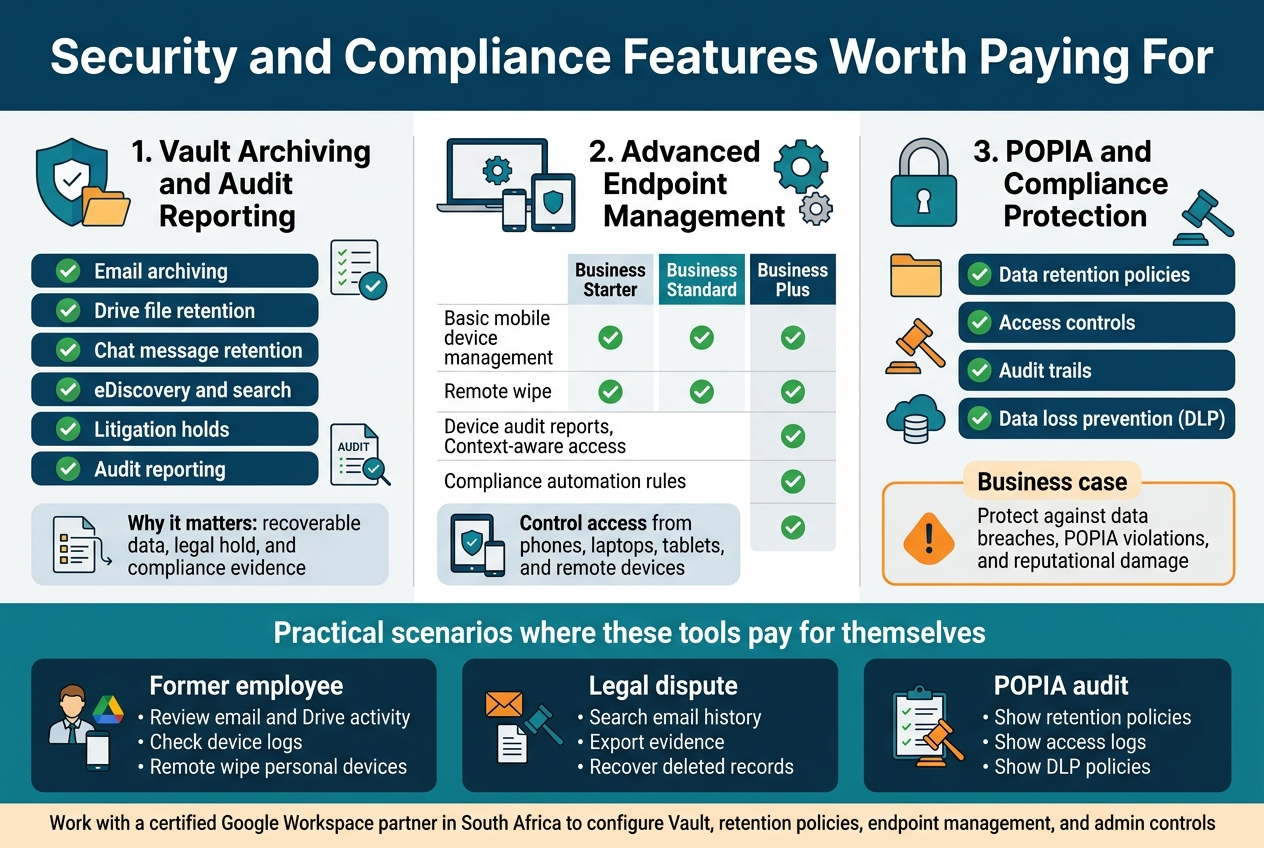
Vault Archiving and Audit Reporting in Higher Tiers
When it comes to keeping your business data safe, recoverable, and accountable, Google Vault is one of those features that quietly does heavy lifting in the background — until the day you desperately need it and you’re incredibly glad it’s there.
Google Vault is available as part of Google Workspace Business Plus and is not included in the Business Starter or Business Standard plans. This is one of the most significant functional differences between the tiers, especially for South African businesses operating in regulated industries like finance, healthcare, legal services, or any sector that falls under the Protection of Personal Information Act (POPIA).
What Vault Actually Does
Vault is Google’s information governance and archiving solution. Here’s what it handles:
- Email archiving — Every email sent or received by users in your domain can be automatically retained for a defined period, even if the user deletes it from their inbox
- Drive file retention — Documents, spreadsheets, and other Drive files can be placed under retention policies so they aren’t permanently deleted
- Chat message retention — Google Chat messages can also be archived and retained
- eDiscovery and search — Legal teams or compliance officers can search across all retained data by keyword, date range, user, or account
- Litigation holds — Specific accounts or data sets can be placed on hold so nothing is deleted during an active investigation or legal dispute
- Audit reporting — Vault keeps detailed logs of who accessed what data, when, and what actions were taken
For any South African business that might face a dispute, regulatory audit, or internal investigation, the ability to produce a complete email trail or document history is not a luxury — it’s a business survival tool.
Why Audit Reporting Matters More Than You Think
Audit reports inside Vault give administrators a clear view of data access and user activity. This goes beyond just knowing who sent which email. You can see:
- Which users exported data from Vault
- What search queries were run and by whom
- When holds were created, modified, or released
- Who changed retention rules and when
This level of transparency is critical when you need to demonstrate compliance to a regulator, a client, or a legal team. Without it, you’re essentially operating on trust and memory — neither of which holds up in a formal audit.
South African businesses that work with international clients are also increasingly expected to meet data governance standards aligned with GDPR or ISO 27001 frameworks. Having Vault in place helps you demonstrate that your organisation takes records management seriously.
Advanced Endpoint Management Capabilities
Endpoint management is how you control what happens to company data when it lives on devices — phones, laptops, tablets — that belong to employees. This is where Google Workspace plans start to show meaningful differences in how much control your IT administrator actually has.
Basic vs Advanced Endpoint Management
Business Starter and Business Standard come with basic mobile device management (MDM), which allows admins to enforce screen locks, remotely wipe managed devices, and require device encryption. It’s a solid baseline for smaller teams.
Business Plus steps this up significantly with advanced endpoint management, which includes:
- Device approvals — Admins can require approval before a new device can access company data
- Audit and activity reports for devices — See a full log of device activity across your organisation
- App management — Push, manage, and restrict which apps are allowed on managed Android and iOS devices
- Compliance rules — Set up automated actions when a device falls out of compliance (for example, blocking access if a device doesn’t have an updated OS)
- Context-aware access — Control access to Google Workspace apps based on device health, user identity, and network location
- Device inventory management — Maintain a full list of all devices accessing your company data
Why This Matters for South African Businesses Specifically
South Africa has a rapidly growing remote and hybrid workforce. Many businesses have employees working from home, on personal devices, or from different cities. This creates a real challenge: how do you ensure that company data isn’t being accessed from a compromised or unmanaged device in someone’s living room?
Advanced endpoint management answers that question directly. It gives IT administrators the tools to set rules like:
- Only allow access to Google Drive from devices that have passed a security check
- Automatically block access if a device is reported lost or stolen
- Require that a device be enrolled in mobile device management before it can sync company email
For small to medium businesses in South Africa that don’t have a large IT team, these automated rules are a game-changer. You don’t need someone manually checking every device. You set the rules once, and the system enforces them continuously.
Comparing Endpoint Management Across Plans
| Feature | Business Starter | Business Standard | Business Plus |
|---|---|---|---|
| Basic mobile device management | ✅ | ✅ | ✅ |
| Remote wipe | ✅ | ✅ | ✅ |
| Device approvals | ❌ | ❌ | ✅ |
| App management (Android & iOS) | ❌ | ❌ | ✅ |
| Device audit reports | ❌ | ❌ | ✅ |
| Context-aware access | ❌ | ❌ | ✅ |
| Compliance automation rules | ❌ | ❌ | ✅ |
If your team is entirely office-based and all devices are company-owned and managed, Business Starter’s basic MDM might be enough. But the moment you have staff using personal phones, working remotely, or accessing company data from multiple locations, the advanced controls in Business Plus start making a lot of practical sense.
How Compliance Tools Protect South African Businesses
Compliance isn’t just about ticking boxes on a regulatory checklist. Done properly, it’s about building a business that can prove what it did, when it did it, and why — and that’s a competitive advantage as much as it is a legal requirement.
POPIA and What It Demands of Your Business
The Protection of Personal Information Act (POPIA) came into full effect in South Africa in July 2021. It governs how businesses collect, store, process, and share personal information. Non-compliance carries serious consequences, including fines and reputational damage.
Google Workspace, particularly at the Business Plus level, helps South African businesses align with POPIA requirements in several ways:
- Data retention policies — Vault allows you to define exactly how long personal information is kept and ensures it’s deleted automatically when the retention period expires
- Access controls — Endpoint management and admin controls let you limit who can access personal data, which is a core POPIA requirement
- Audit trails — Being able to show regulators exactly who accessed personal information, and when, is a key part of demonstrating accountability under POPIA
- Data loss prevention (DLP) — Available in higher tiers, DLP rules can automatically detect and block the sharing of sensitive information like ID numbers, banking details, or health data via email or Drive
Data Residency and Where Your Data Lives
One concern that comes up frequently for South African businesses is where Google actually stores their data. Google offers data region policies that allow administrators to specify that data is stored in a particular geographic region. This is relevant for businesses that operate under contractual obligations to keep data within certain borders, or for those who want to ensure their data isn’t sitting in a jurisdiction with different legal frameworks.
While this isn’t exclusive to Business Plus, it becomes significantly more valuable when paired with the audit and compliance tools that higher tiers provide. Knowing where your data is stored and being able to prove it through audit logs is a much stronger compliance position than just hoping for the best.
The Business Case for Paying for Compliance Features
Some business owners look at the cost difference between Business Starter and Business Plus and wonder whether the security and compliance features justify the price. Here’s a straightforward way to think about it:
What’s the cost of a data breach or a POPIA violation?
Regulatory fines aside, the reputational damage from a data incident in South Africa can be severe — particularly if you serve clients who take data privacy seriously. One compromised employee account, one lost device with unwiped company data, or one email sent to the wrong recipient containing personal information can trigger a reportable incident under POPIA.
Now compare that risk against the cost of a Google Workspace Business Plus license per user. When viewed as risk mitigation, the investment looks very different.
Practical Scenarios Where These Tools Pay for Themselves
Scenario 1: A Former Employee
An employee leaves your company and you’re concerned they may have shared or exported sensitive client data before their last day. With Vault and endpoint management in place, you can:
- Review their email and Drive activity for the weeks leading up to their departure
- Check device audit logs to see what was accessed and when
- Remotely wipe any company data from their personal devices
Without these tools, you’d be entirely in the dark.
Scenario 2: A Legal Dispute
A client claims you never delivered on a contractual obligation. With Vault, you can search the email history between your team and the client going back years, pull the relevant communications, and export them in a legally defensible format.
Without Vault, if those emails were deleted or the relevant employee’s account was removed, that evidence is simply gone.
Scenario 3: A POPIA Audit
The Information Regulator requests evidence that your organisation has appropriate controls over personal information. With Business Plus tools, you can produce:
- Retention policies showing how long personal data is kept
- Access logs showing who had access to sensitive data
- DLP policies showing how sensitive data is flagged and protected
This is the difference between a business that has compliance infrastructure and one that has good intentions but no paper trail.
Working with a Google Partner in South Africa
Navigating these features and understanding exactly which plan gives your business the right level of protection is much easier when you work with a certified Google Workspace partner. Partners like Othware, who specialise in Google Workspace licensing for South African businesses, can help you assess your compliance obligations, map them to the right plan features, and ensure your Google Workspace environment is configured to actually deliver on the security promises that come with each tier.
Buying the right plan is only half the equation. Making sure Vault is properly configured, retention policies are set, endpoint management rules are active, and admin controls are locked down is where a local Google Partner adds real, measurable value — particularly for businesses navigating POPIA requirements for the first time.
Choosing the Right Plan for Your Business Size and Budget
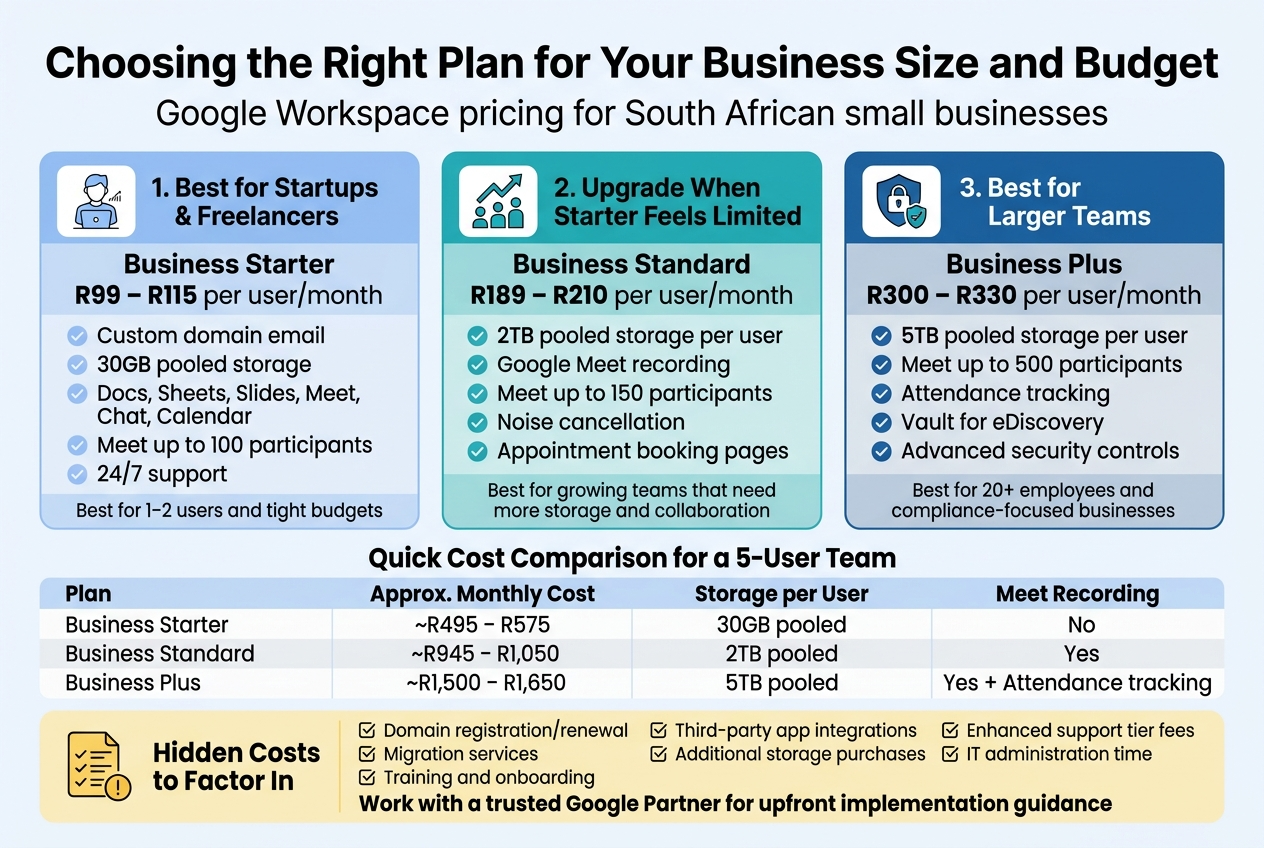
Best Plan for Startups and Freelancers on a Tight Budget
If you’re just getting your business off the ground or working as a freelancer in South Africa, Google Workspace Business Starter is almost always the right starting point. At roughly R99 to R115 per user per month (depending on your reseller and whether you’re billed monthly or annually), it gives you everything you need to look professional and stay organised without stretching your budget thin.
What makes Starter genuinely useful for small operations is that it covers the basics extremely well. You get a custom Gmail address on your own domain, which immediately makes you look more credible than a @gmail.com address when sending proposals or invoices. You get 30GB of pooled storage per user across Google Drive, Gmail, and Meet recordings. You get access to the full Google Workspace suite — Docs, Sheets, Slides, Meet, Chat, Calendar, and more. For a solo freelancer or a two-person startup, that’s plenty.
Where Starter shines for tight budgets:
- Low per-user cost keeps monthly expenses predictable
- No need to pay for third-party email hosting, document storage, and video conferencing separately
- Google Meet allows up to 100 participants, which is more than enough for client calls and small team meetings
- 24/7 support is included, even on the base plan
- You can start with just one user and scale up as you grow
The honest reality for freelancers is that you may only need one or two licences for years. Google Workspace Business Starter lets you pay exactly for what you use without being locked into minimums that don’t suit your business size. Compared to alternatives like Microsoft 365 or local email hosting services, the value-to-cost ratio on Starter is hard to beat for South African small businesses watching every rand.
One thing to keep in mind: the 30GB pooled storage can fill up faster than you’d expect if you’re regularly storing large design files, video content, or client project folders. If you hit that wall frequently, it might be a sign that upgrading makes financial sense — but more on that below.
When Upgrading from Starter to Standard Makes Financial Sense
Moving from Business Starter to Business Standard isn’t just about wanting more features — it’s about reaching a point where the limitations of Starter are actually costing you time, money, or opportunities. At around R189 to R210 per user per month, Business Standard costs roughly double the Starter price, so the upgrade needs to earn its keep.
The single biggest reason most South African businesses upgrade is storage. Business Standard gives you 2TB of pooled storage per user, compared to Starter’s 30GB. If you have a team of five people sharing files, running collaborative projects, and saving Meet recordings, 30GB per person disappears fast. With Standard, you’re unlikely to hit storage limits for years.
Upgrade from Starter to Standard when:
- Your team regularly shares large files and Google Drive is constantly near capacity
- You need to record Google Meet calls for client records, compliance, or team members who couldn’t attend live
- You run client-facing meetings or webinars and need the ability to host up to 150 participants instead of 100
- You want noise cancellation in Google Meet, which makes a real difference in open-plan offices or when working from home
- You need the ability to schedule meetings where attendees can book time directly through appointment booking pages
The recording feature alone is often what tips businesses toward Standard. If you’re a consulting firm, a training company, or a business that holds regular all-hands meetings, being able to record and store those sessions in Drive is practically a necessity rather than a luxury.
From a Google Workspace pricing South Africa perspective, the jump from Starter to Standard represents roughly R90 to R95 extra per user per month. For a team of five, that’s around R450 to R475 per month more. If recording meetings, saving time on storage management, and running smoother video calls saves even a few hours of admin work per month, the maths works in your favour quickly.
A quick cost comparison for a 5-user team:
| Plan | Approx. Monthly Cost (5 users) | Storage per User | Meet Recording |
|---|---|---|---|
| Business Starter | ~R495 – R575 | 30GB pooled | No |
| Business Standard | ~R945 – R1,050 | 2TB pooled | Yes |
| Business Plus | ~R1,500 – R1,650 | 5TB pooled | Yes + Attendance tracking |
The Standard plan sits in a sweet spot for growing South African small businesses that have moved past the scrappy startup phase and need more professional tooling without enterprise-level pricing.
Why Larger Teams Get Better Value from Business Plus
As your team grows beyond 15 or 20 people, the calculus around Google Workspace plans shifts significantly. Business Plus at roughly R300 to R330 per user per month starts looking far more attractive because the features it includes solve problems that larger teams run into constantly.
The headline upgrade in Business Plus is enhanced security and compliance. You get eDiscovery and audit tools, which are critical if your business operates in financial services, legal, healthcare, or any sector where you might need to retrieve historical emails or documents for compliance or legal proceedings. You also get Vault — Google’s archiving and information governance tool — which lets you retain, search, and export data according to your own retention policies.
For businesses with 20 or more employees in South Africa, the ability to manage information governance properly isn’t optional. POPIA (the Protection of Personal Information Act) requires businesses to be able to demonstrate how they handle, store, and can retrieve personal data. Business Plus gives you the infrastructure to do that properly.
Why larger teams get better value from Business Plus:
- 5TB pooled storage per user — a 50-person team gets 250TB total, which is practically unlimited for most businesses
- Google Meet supports up to 500 participants — essential for company-wide calls or large client webinars
- Attendance tracking in Meet — managers and HR teams can confirm who attended which meetings without manual sign-in processes
- Enhanced security controls — advanced mobile device management, endpoint verification, and context-aware access policies
- Vault for eDiscovery — search and export emails, Drive files, and Chat messages for legal or compliance purposes
- Google Meet noise cancellation and recording are both included, as in Standard
The per-user cost is higher on Business Plus, but across a larger team, the operational value compounds. Consider a 25-person professional services firm. Without Vault and eDiscovery, a single legal dispute that requires email retrieval could mean hours of manual searching or expensive third-party archiving tools. With Business Plus, those tools are built in and the cost is already factored into your monthly licence fee.
Thinking about it from a per-user perspective:
For a 25-user team, the difference between Standard and Plus is roughly R110 per user per month, totalling about R2,750 extra per month. Against the cost of a single compliance incident, data breach response, or the licensing fee for a standalone archiving solution, that difference often looks modest.
Working with a certified Google Partner in South Africa like Othware means you can also get proper guidance on whether your specific business size and compliance obligations make Plus the right fit — or whether Standard covers you adequately and saves you money.
Hidden Costs to Factor into Your Total Investment
The listed price for any Google Workspace plan in South African rands is rarely the complete picture of what you’ll actually spend. Before committing to a plan or advising a client on Google Workspace license South Africa pricing, it’s worth thinking through the additional costs that can catch businesses off guard.
Domain Registration and Renewal
Google Workspace requires a custom domain. If you don’t already own one, you’ll need to register it — typically R150 to R250 per year for a .co.za domain, or slightly more for .com. Renewal costs are ongoing and should be factored into your annual budget.
Migration Costs
Moving from an old email system (Outlook, cPanel hosting, another Google account) to Google Workspace isn’t always plug-and-play. If you have years of emails, contacts, and calendar data to migrate, you may need professional migration services. A reputable Google Workspace partner can handle this, but it comes at a cost — often a once-off fee ranging from R1,500 to R10,000+ depending on the size and complexity of the migration.
Training and Onboarding
If your team has never used Google Workspace before, there’s a real productivity dip during the transition period. You can minimise this with proper onboarding, but that training either costs money (if you bring in a specialist) or costs time (if someone internal takes ownership of getting everyone up to speed).
Third-Party App Integrations
Google Workspace integrates with hundreds of third-party tools — accounting software, CRMs, project management platforms, and more. Some integrations are free, but others require paid connectors or middleware tools. If your business workflow depends heavily on a specific app integration, check the costs before you commit to a plan.
Add-On Storage
If you choose Business Starter and find that 30GB pooled storage isn’t enough, but you’re not quite ready to upgrade to Standard for other reasons, you can purchase additional storage separately. This is often less cost-effective than simply upgrading, but it’s an option worth knowing about.
Support Plans
All Google Workspace plans include standard support, but if your business can’t afford downtime and needs guaranteed response time SLAs, you may want to consider Enhanced or Premium support tiers — which come at additional cost.
A practical hidden costs checklist:
- Domain registration/renewal fees
- Professional email or data migration services
- Staff training or onboarding support
- Paid third-party app integrations
- Additional storage purchases (if staying on Starter)
- Enhanced support tier fees
- IT administration time for initial setup and ongoing management
When you add all of this up, the true cost of deploying Google Workspace for a small South African business can be meaningfully higher than the headline per-user price. That’s not a reason to avoid it — the platform’s value absolutely justifies the investment for most businesses — but going in with clear eyes about total costs means you won’t be caught out by unexpected expenses three months down the line.
The smart approach is to work with a trusted Google Partner who knows the South African market and can give you a realistic implementation cost before you commit, not after. Getting that upfront clarity is one of the more underrated parts of the whole decision process.
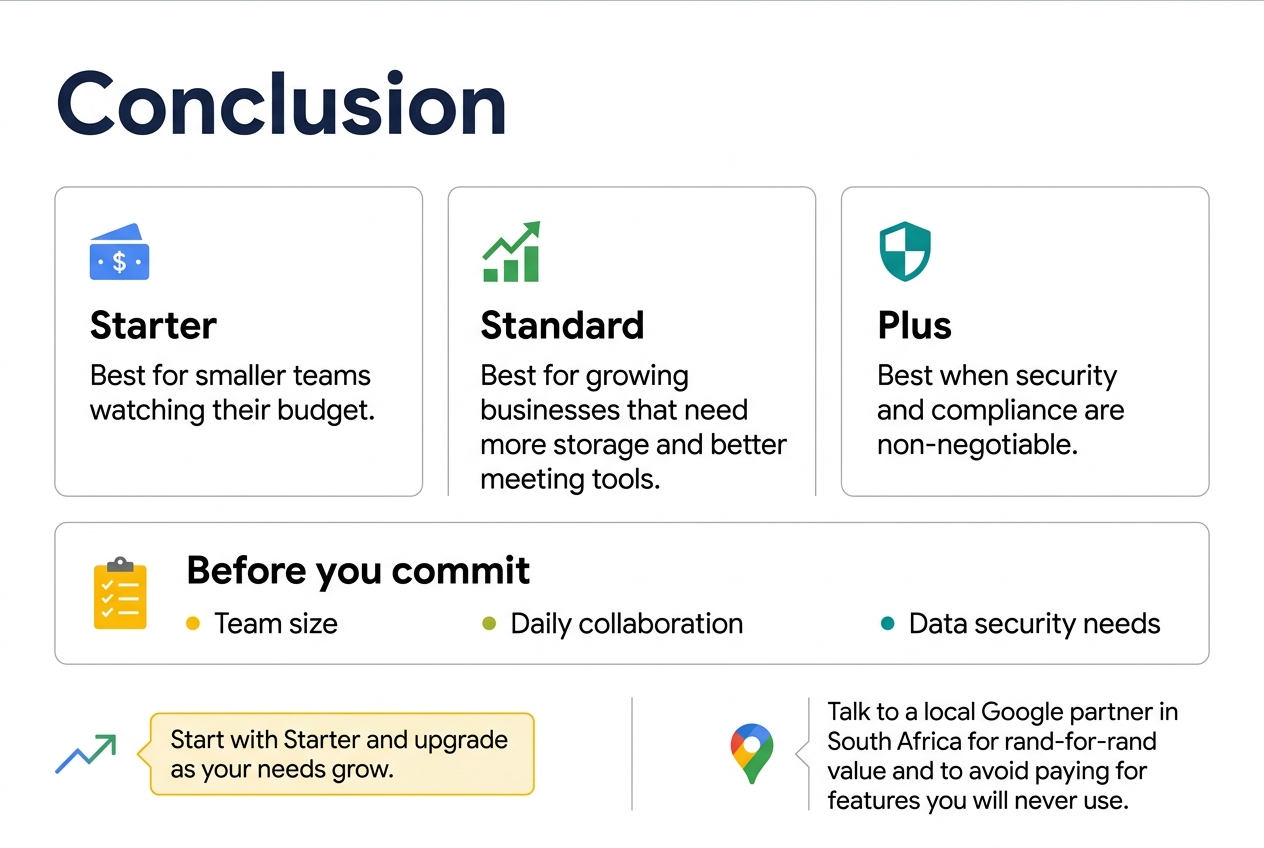
Picking the right Google Workspace plan really comes down to knowing what your business actually needs right now. The Starter plan works well for smaller teams watching their budget, Standard hits the sweet spot for growing businesses that need more storage and better meeting tools, and Plus makes sense when security and compliance are non-negotiables. Each tier builds on the last, so you’re really just deciding how much firepower your team needs.
Before you commit, take a honest look at your team size, how you collaborate day-to-day, and what data security looks like for your industry. If you’re still on the fence, start with Starter and upgrade as your needs grow – Google Workspace makes that transition pretty painless. Reach out to a local Google partner in South Africa who can walk you through the rand-for-rand value of each plan and help you avoid paying for features you’ll never touch.