
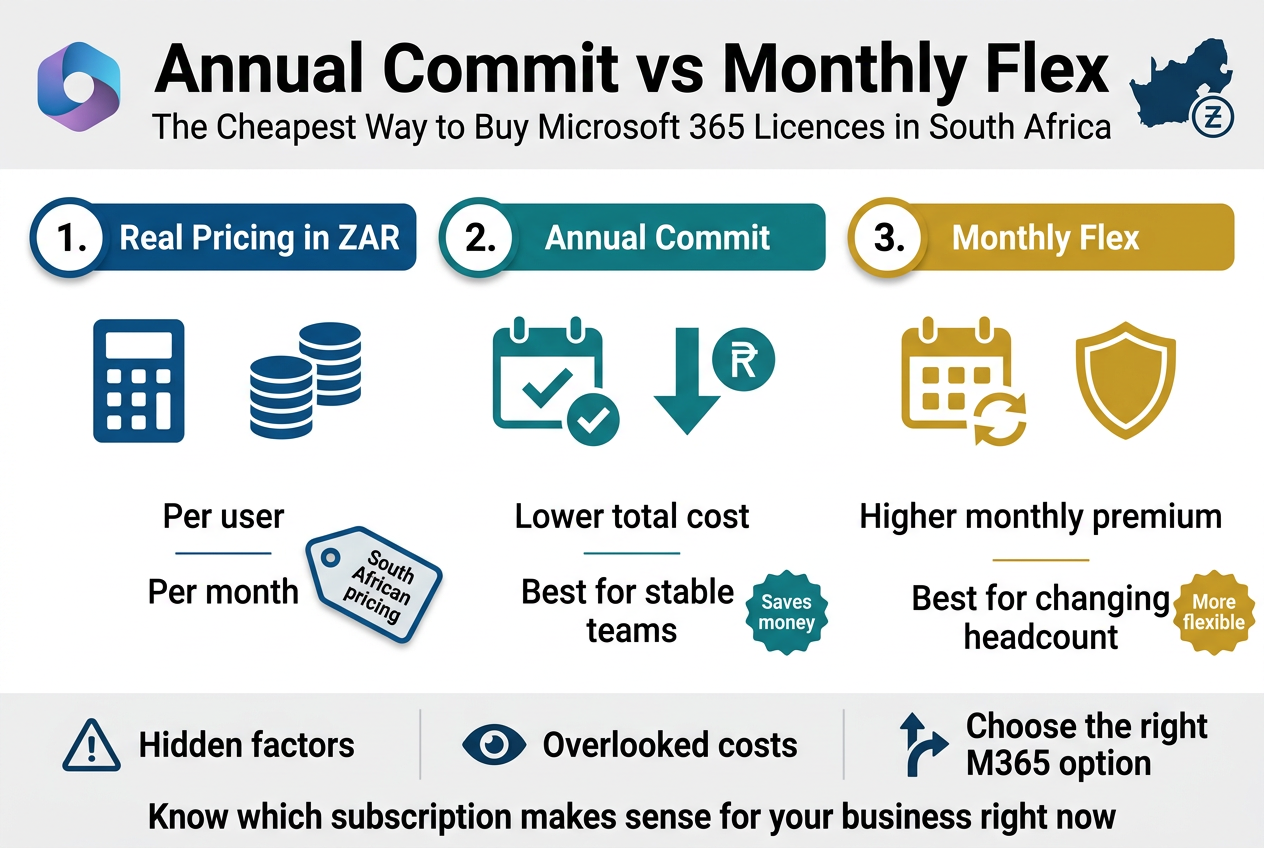
Annual Commit vs Monthly Flex: The Cheapest Way to Buy Microsoft 365 Licences in South Africa
If you’re trying to figure out the cheapest Microsoft 365 plan in South Africa, you’ve probably already noticed that the pricing isn’t exactly straightforward. There are two main ways to buy Microsoft 365 licences in South Africa — annual commit and monthly flex — and the difference in cost can genuinely surprise you when you do the sums in rands.
This guide is for South African business owners, IT managers, and finance decision-makers who want a clear, honest breakdown before committing to a subscription. No jargon, no guesswork.
Here’s what we’ll cover:
- The real Microsoft 365 pricing in South Africa in ZAR — what each model actually costs you per user, per month
- When annual commit saves you money and when monthly flex is worth the premium
- The hidden factors most people overlook that can quietly push your total Microsoft 365 licence cost ZAR higher than expected
By the end, you’ll know exactly which M365 subscription option makes sense for your business right now — and which one you should avoid.
Understanding the Two Licensing Models Available in South Africa
What Annual Commit Licensing Means for Your Business
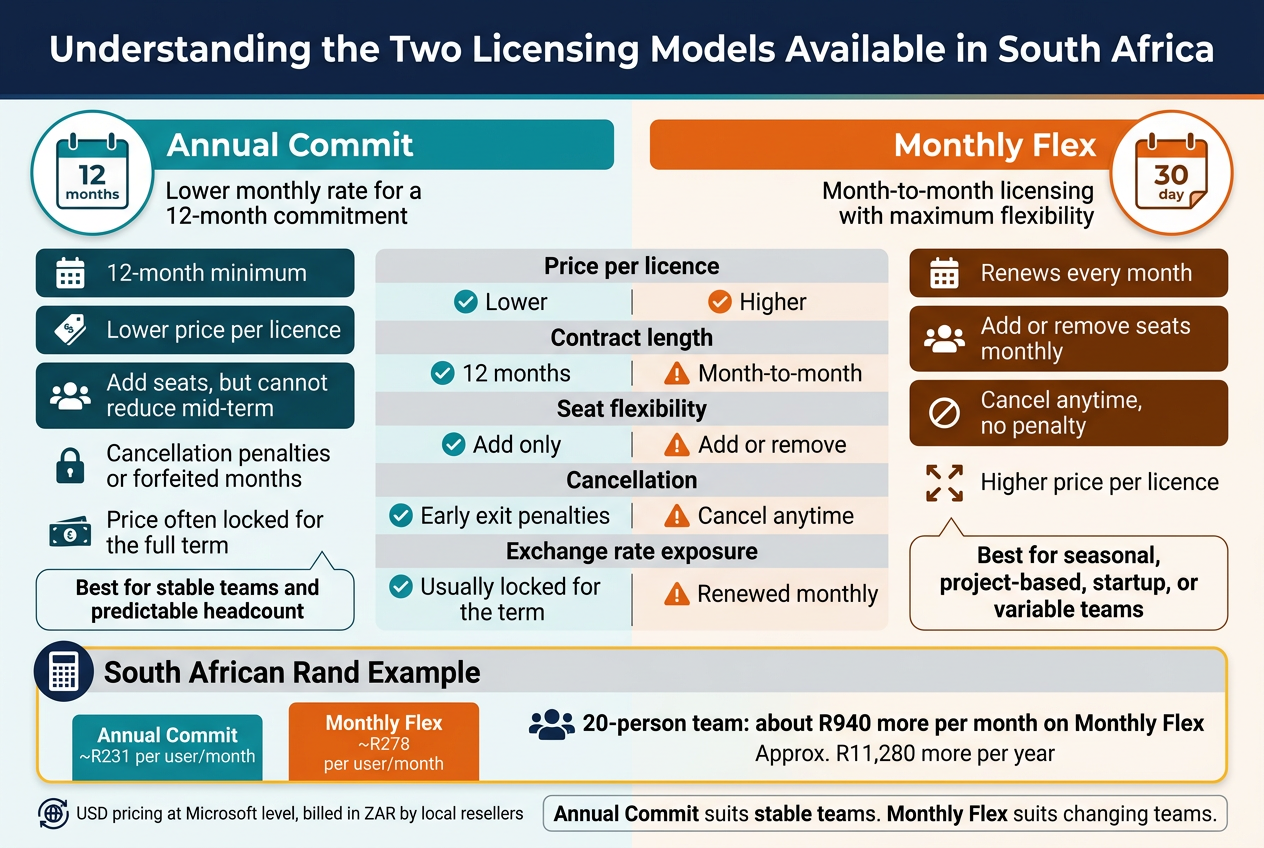
When you sign up for Microsoft 365 on an annual commit basis, you’re making a 12-month promise to Microsoft — and in return, Microsoft gives you a lower monthly rate. Think of it like signing a lease on a flat versus paying month-to-month. The landlord rewards you for the commitment because they get financial certainty. Microsoft operates on exactly the same logic.
In South Africa, annual commit licences are available through two payment structures:
- Annual Commit, Paid Monthly — You lock in for a year, but your payments go out every month. You get the discounted annual rate, but you can’t cancel halfway through without facing penalties or forfeiting the remaining months.
- Annual Commit, Paid Upfront — You pay the entire 12 months at the start of the subscription. In some cases, Microsoft or local resellers offer a slight additional discount for the upfront payment, though this varies by reseller and plan.
For South African businesses, the annual commit model is the standard recommendation from most Microsoft Cloud Solution Providers (CSPs). The pricing is quoted in US dollars at the Microsoft level, but local resellers bill you in South African rands at an applicable exchange rate, which is an important detail we’ll dig into later in this post.
What You’re Committing To
With annual licensing, you’re committing to:
- A fixed number of licences for 12 months
- A fixed price per licence for that period (depending on your reseller’s terms)
- No ability to reduce your seat count mid-term (you can usually add seats, but not remove them)
This structure works brilliantly when your team size is predictable and stable. If you run a 25-person accounting firm and your headcount barely moves year to year, annual commit is almost always the more affordable route for Microsoft 365 licensing in South Africa.
Annual Commit and Exchange Rate Exposure
One nuance that South African buyers need to understand is exchange rate risk. Because Microsoft’s underlying pricing is in USD, your rand cost can shift when your annual renewal comes around. Most local resellers will lock your rand price for the 12-month term, which actually works in your favour during periods of rand weakness — but it also means you could pay more in rand terms at renewal if the USD/ZAR rate has moved unfavourably.
This is why choosing a reputable local Microsoft CSP matters. Some resellers offer rate-lock agreements or fixed-rand pricing for the full annual term, which takes the currency guesswork off the table for your budgeting.
How Monthly Flex Licensing Works and Who It Suits
Monthly flex licensing — sometimes called month-to-month or simply “monthly” licensing — gives you the freedom to adjust, cancel, or change your Microsoft 365 subscription every single month. There’s no 12-month rope around your neck. Every 30 days, your subscription renews and you can scale up, scale down, or walk away entirely.
The catch? You pay a premium for that flexibility. Microsoft 365 monthly flex pricing is typically 20% to 25% higher per licence per month compared to the annual commit rate. In rand terms, that difference adds up faster than most business owners realise when they sit down and do the actual maths.
How the Monthly Flex Model Works in Practice
- Licences renew on a monthly billing cycle
- You can add or remove seats each month based on actual usage
- No long-term penalties for cancellation — just don’t renew next month
- Pricing is still quoted in USD at the Microsoft level, converted to ZAR by your local reseller
The monthly flex model sounds appealing on paper. Who wouldn’t want maximum flexibility? But for most businesses in South Africa with a stable workforce and a genuine need for Microsoft 365 tools, the ongoing price premium quickly erodes any savings that flexibility might have theoretically offered.
Who Actually Benefits From Monthly Flex
The monthly flex model genuinely makes sense for a specific type of buyer:
- Project-based businesses that bring in contract staff for 2–4 months at a time and need licences temporarily
- Seasonal businesses where headcount swells in certain months (think retail around peak season, or tourism operators)
- Startups in early growth phases where hiring is unpredictable and adding or removing licences frequently is a real operational need
- Businesses evaluating Microsoft 365 before committing to a full annual plan — a short trial period on monthly flex can make sense before locking in
- SMEs managing cash flow tightly who cannot commit to a 12-month obligation even if the per-unit cost is higher
If you fall into one of these categories, the monthly flex model isn’t wasteful — it’s a legitimate tool for managing your licensing costs relative to your actual business rhythm.
Key Differences Every South African Buyer Should Know
To cut straight to what matters, here’s a direct comparison of the two models across the dimensions that affect South African businesses most:
| Factor | Annual Commit | Monthly Flex |
|---|---|---|
| Price per licence | Lower (typically 20–25% cheaper per month) | Higher (premium for flexibility) |
| Contract length | 12 months minimum | Month-to-month, no lock-in |
| Seat flexibility | Can add seats; cannot reduce mid-term | Add or remove seats each month |
| Cancellation | Penalties or forfeiture if cancelled early | Cancel anytime, no penalty |
| Best for | Stable teams with predictable headcount | Variable teams, seasonal needs, short-term projects |
| Payment options | Monthly or upfront annual payment | Monthly only |
| ZAR budgeting | Easier to predict for the year | Can fluctuate if exchange rates move |
| Exchange rate exposure | Usually locked for the annual term | Renewed monthly, more frequent rate exposure |
The Real Price Gap in South African Rands
To make this concrete, consider Microsoft 365 Business Standard as an example. At the time of writing, the Microsoft-listed price is approximately $12.50 USD per user per month on an annual commit basis, versus $15.00 USD per user per month on monthly flex.
At an exchange rate of R18.50 per USD, that translates to roughly:
- Annual commit: ~R231 per user per month
- Monthly flex: ~R278 per user per month
For a 20-person team, that’s a difference of approximately R940 per month, or nearly R11,280 per year — just for choosing one licensing model over the other. That’s not small change for a South African SME.
Now factor in that exchange rates fluctuate, that local resellers apply their own margins, and that some plans carry additional differences, and the gap could be even wider in practice.
Understanding Licence Assignment and Management
Both models require you to assign licences to specific users — this isn’t a pooled resource situation. Whether you’re on annual commit or monthly flex, each Microsoft 365 licence is tied to a named user account in your Microsoft tenant. The difference is purely in the commercial terms governing how many licences you hold and for how long.
Under annual commit, you’re responsible for every licence you signed up for, whether or not all your seats are actively used. If you hire 30 people and pay for 30 licences, then three people leave in month four, you’re still paying for 30 licences until the renewal date.
Under monthly flex, you could theoretically drop those three licences in the next billing cycle and bring your active paid seats back to 27. That’s the genuine value proposition of flex — but it only translates into real savings if your team actually fluctuates and you actively manage your licence count month to month.
What South African Resellers Don’t Always Tell You
Most Microsoft CSPs in South Africa default to recommending annual commit because it’s administratively simpler and the pricing story is straightforward. That’s a fair recommendation for most clients — but it means buyers with genuinely variable needs sometimes get pushed onto annual contracts that don’t fit their business model.
On the flip side, some smaller or less experienced resellers push monthly flex as a lower-commitment “starter” option without clearly explaining the long-term cost implication. Over 24 months, the accumulated overspend on monthly flex can be substantial for a business that actually has a stable team.
The smartest approach is to model your own numbers:
- Work out your average expected headcount over the next 12 months
- Calculate the annual cost at the annual commit rate
- Calculate the annual cost at the monthly flex rate based on your expected team changes
- See which number is lower — and build in a reasonable buffer for unexpected changes
For the vast majority of South African businesses with more than five employees and any degree of operational stability, the annual commit model delivers meaningfully cheaper Microsoft 365 licensing in rands. But the monthly flex option exists for good reason, and for the right business at the right time, it can be exactly what the situation calls for.
Breaking Down the Real Costs in South African Rands
Annual Commit Pricing Per User Per Month
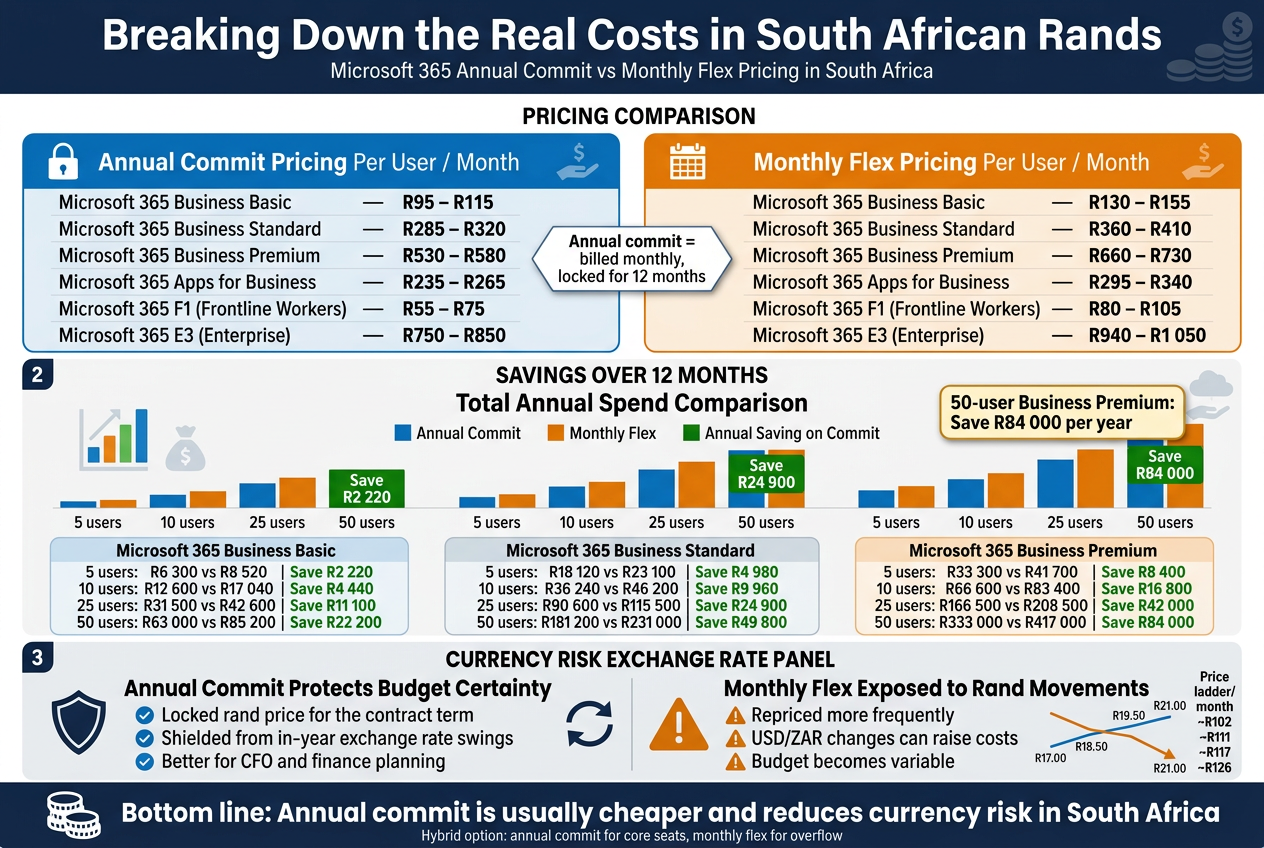
When you sign up for Microsoft 365 on an annual commit basis in South Africa, you’re locking in a fixed monthly price per user for a full 12-month term. You pay that rate every month, but you’ve agreed upfront to keep the subscription active for the entire year. Cancelling early typically means penalties or forfeiting the remaining months depending on your reseller agreement.
Here’s what annual commit pricing looks like across the most commonly purchased Microsoft 365 plans for South African businesses, based on 2024 local reseller pricing (note that exact figures can vary slightly between resellers, but these reflect the general market range):
| Microsoft 365 Plan | Annual Commit Price (ZAR per user/month) |
|---|---|
| Microsoft 365 Business Basic | R95 – R115 |
| Microsoft 365 Business Standard | R285 – R320 |
| Microsoft 365 Business Premium | R530 – R580 |
| Microsoft 365 Apps for Business | R235 – R265 |
| Microsoft 365 F1 (Frontline Workers) | R55 – R75 |
| Microsoft 365 E3 (Enterprise) | R750 – R850 |
These prices are billed monthly but committed annually. The key advantage here is price stability — your finance team can budget accurately for the full financial year without worrying about currency swings hitting you mid-year.
Annual commit plans are typically what Microsoft and its Cloud Solution Provider (CSP) partners push hardest, and for most stable businesses with a reasonably predictable headcount, this makes sense financially. The savings compared to monthly flex are significant, and we’ll get into the exact numbers shortly.
Monthly Flex Pricing Per User Per Month
Monthly flex licensing gives you the freedom to scale up or down every month without penalty. You add a user in March, you pay for March. You remove a user in June, your June bill drops. That flexibility sounds great — and sometimes it genuinely is — but it comes at a cost premium that can be surprisingly large when you stack it up annually.
Here’s the same lineup of plans on a monthly flex basis:
| Microsoft 365 Plan | Monthly Flex Price (ZAR per user/month) |
|---|---|
| Microsoft 365 Business Basic | R130 – R155 |
| Microsoft 365 Business Standard | R360 – R410 |
| Microsoft 365 Business Premium | R660 – R730 |
| Microsoft 365 Apps for Business | R295 – R340 |
| Microsoft 365 F1 (Frontline Workers) | R80 – R105 |
| Microsoft 365 E3 (Enterprise) | R940 – R1 050 |
The monthly flex premium over annual commit sits somewhere between 20% and 35% depending on the plan and the reseller. That’s not a small difference. On Business Standard, for example, you could be paying anywhere from R75 to R90 more per user per month just for the privilege of flexibility.
For a business with 10 users on Business Standard, that’s a potential extra R900 per month, or R10 800 per year — just to stay on month-to-month. That money could easily cover a cloud backup solution, an endpoint security tool, or a few months of Microsoft Teams Phone add-ons.
Total Annual Spend Comparison Across Popular Plans
This is where the rubber meets the road. Seeing the per-user-per-month difference is one thing, but when you multiply it across a real team size and project it over 12 months, the gap becomes much harder to ignore.
The tables below use mid-range pricing to give you a realistic comparison for South African businesses at different headcounts.
Microsoft 365 Business Basic (Mid-Range: R105 Annual vs R142 Monthly)
| Team Size | Annual Commit (12 months) | Monthly Flex (12 months) | Annual Saving on Commit |
|---|---|---|---|
| 5 users | R6 300 | R8 520 | R2 220 |
| 10 users | R12 600 | R17 040 | R4 440 |
| 25 users | R31 500 | R42 600 | R11 100 |
| 50 users | R63 000 | R85 200 | R22 200 |
Microsoft 365 Business Standard (Mid-Range: R302 Annual vs R385 Monthly)
| Team Size | Annual Commit (12 months) | Monthly Flex (12 months) | Annual Saving on Commit |
|---|---|---|---|
| 5 users | R18 120 | R23 100 | R4 980 |
| 10 users | R36 240 | R46 200 | R9 960 |
| 25 users | R90 600 | R115 500 | R24 900 |
| 50 users | R181 200 | R231 000 | R49 800 |
Microsoft 365 Business Premium (Mid-Range: R555 Annual vs R695 Monthly)
| Team Size | Annual Commit (12 months) | Monthly Flex (12 months) | Annual Saving on Commit |
|---|---|---|---|
| 5 users | R33 300 | R41 700 | R8 400 |
| 10 users | R66 600 | R83 400 | R16 800 |
| 25 users | R166 500 | R208 500 | R42 000 |
| 50 users | R333 000 | R417 000 | R84 000 |
When you look at a 50-user business running Business Premium, the annual commit option saves them R84 000 per year. That’s not pocket change — that’s almost enough to hire a junior IT support person or fund a full cybersecurity audit.
The savings scale quickly with headcount, which is exactly why larger South African businesses almost always default to annual commit for their core Microsoft 365 licences. The financial case is just too strong to ignore.
How Exchange Rate Fluctuations Affect Monthly Flex Costs
This is the part that catches many South African businesses off guard, especially those who signed up for Microsoft 365 a few years ago when the rand was in better shape.
Microsoft prices its licences in US dollars globally. What South African businesses pay in rands is determined by the USD/ZAR exchange rate at the time of billing or at the time the local reseller applies their pricing adjustment. This means your Microsoft 365 licence cost in ZAR is not entirely in your control — it moves with the currency.
How Annual Commit Insulates You (Partially)
When you sign an annual commit contract, your reseller typically locks in a rand price for the duration of that term. This means you’re shielded from in-year exchange rate movements — at least until renewal time. If the rand weakens from R18 to R20 against the dollar mid-year, your bill doesn’t change until your contract renews.
This is a genuinely valuable hedge for South African businesses that need budget certainty. CFOs and finance managers in particular appreciate knowing that the Microsoft 365 line item won’t suddenly spike in August because the rand took a knock.
Why Monthly Flex Is More Exposed
Monthly flex pricing, on the other hand, gets repriced or recalculated more regularly. Depending on the reseller, this could happen monthly, quarterly, or whenever Microsoft or the distributor adjusts the local price list. If you’re on monthly flex and the rand depreciates sharply — which has happened multiple times over the past decade — your per-user cost in rands goes up even though nothing else about your subscription changed.
Consider this scenario: you’re paying R385 per user per month on Business Standard because the rate is sitting at R18/$ when you sign up. Three months later, the rand weakens to R20/$. Your reseller adjusts pricing, and suddenly you’re paying R425 per user. On 20 users, that’s an extra R800 per month you weren’t budgeting for.
The Historical Rand Depreciation Pattern
The rand has lost significant value against the dollar over any multi-year window you choose to look at. The long-term trend is depreciation. This means that businesses on monthly flex in South Africa are systematically exposed to a compounding cost increase that annual commit users can avoid for at least 12 months at a time.
Here’s a rough illustration of how exchange rate movement translates into real cost changes on a popular plan:
| USD/ZAR Rate | Business Standard (USD $6/user/month) | Approximate ZAR Cost per User/Month |
|---|---|---|
| R17.00 | $6.00 | ~R102 (base, before reseller margin) |
| R18.50 | $6.00 | ~R111 |
| R19.50 | $6.00 | ~R117 |
| R21.00 | $6.00 | ~R126 |
Note: These are simplified base figures. Resellers add their margin on top, which is why end-user prices are higher than these figures. But the movement pattern is real.
What This Means Practically
- If you’re on annual commit, lock in your rate at renewal time and treat any rate improvements as a bonus at your next renewal.
- If you’re on monthly flex, you need to build a currency buffer into your IT budget — or accept that your Microsoft 365 bill is a variable cost that you can’t fully control.
- For businesses with tight margins, the currency exposure of monthly flex adds a layer of financial risk that annual commit simply doesn’t carry to the same degree.
Some resellers offer blended or hybrid agreements that give you annual commit pricing on your baseline seat count, with monthly flex available for overflow — this can be a smart middle ground if your headcount fluctuates but you have a reliable core team. It lets you benefit from the pricing stability of annual commit while keeping some flexibility in reserve.
The bottom line on exchange rate exposure is straightforward: in South Africa’s currency environment, annual commit isn’t just cheaper on the list price — it also removes a meaningful variable from your cost equation. That’s worth something beyond the per-user saving, especially as you plan further into the future.
When Annual Commit Is the Smarter Financial Choice
Stable Headcount Businesses Save More Over 12 Months
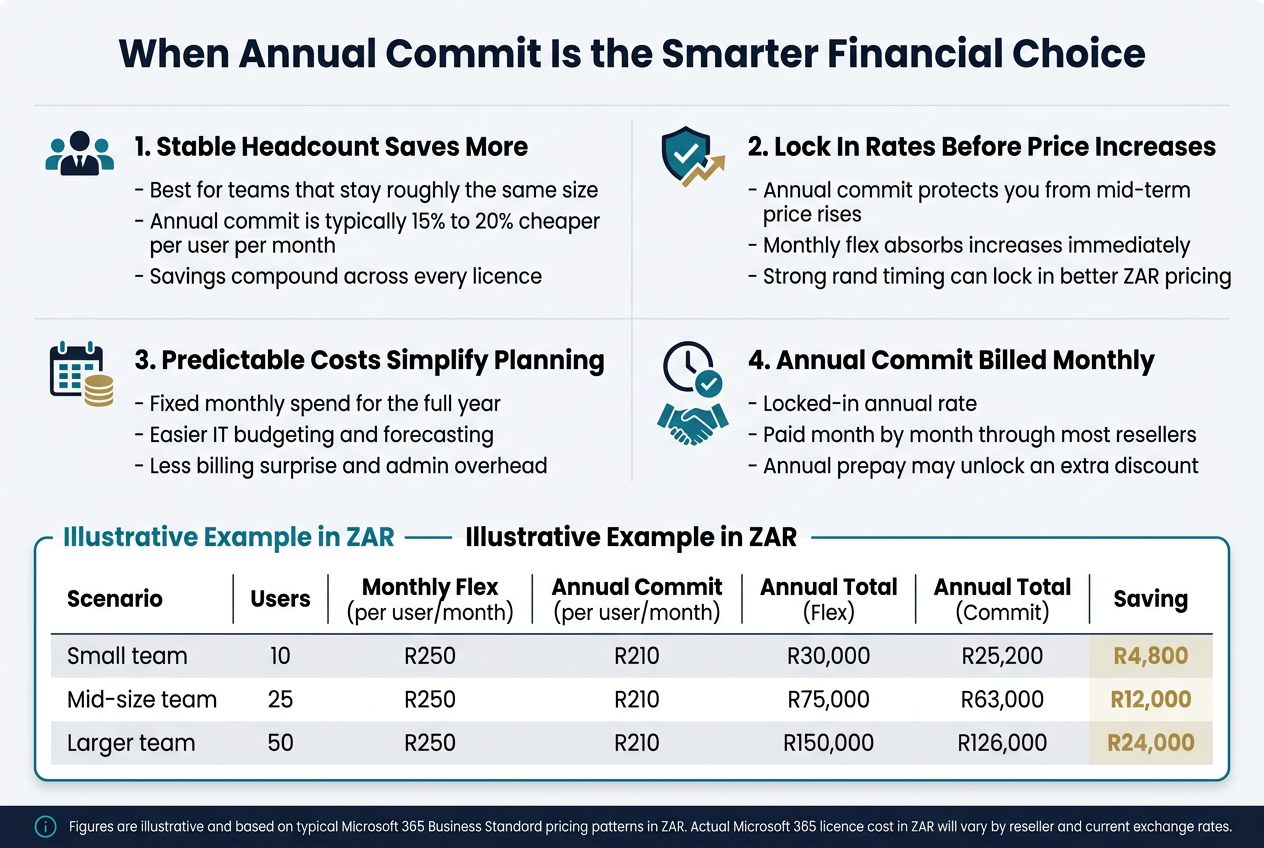
If your team size stays roughly the same month after month, the annual commit model is almost always the better deal. The maths here is straightforward, but the savings are real and they compound across your entire licence count.
When you commit to an annual Microsoft 365 subscription in South Africa, you pay a lower monthly rate than you would on the flexible monthly option. That gap varies depending on which plan you choose, but across the most commonly purchased business tiers, the annual rate typically works out to anywhere between 15% and 20% cheaper per user per month. Multiply that saving across 10, 20, or 50 users, and across 12 months, and you are looking at a meaningful chunk of money staying in your business rather than going to Microsoft.
Here is a simplified example to make the numbers concrete:
| Scenario | Users | Monthly Flex (per user/month) | Annual Commit (per user/month) | Annual Total (Flex) | Annual Total (Commit) | Saving |
|---|---|---|---|---|---|---|
| Small team | 10 | R250 | R210 | R30,000 | R25,200 | R4,800 |
| Mid-size team | 25 | R250 | R210 | R75,000 | R63,000 | R12,000 |
| Larger team | 50 | R250 | R210 | R150,000 | R126,000 | R24,000 |
Note: Figures are illustrative and based on typical Microsoft 365 Business Standard pricing patterns in ZAR. Actual Microsoft 365 licence cost in ZAR will vary by reseller and current exchange rates.
The businesses that benefit most from this model are those with predictable staffing patterns. Think professional services firms like accounting practices, law firms, or engineering consultancies where headcount does not shift dramatically quarter to quarter. Think schools, medical practices, manufacturing businesses with a fixed admin team, or any company where the core workforce stays stable regardless of what time of year it is.
For these organisations, paying a premium for flexibility they will never use is just wasteful spending. Every rand you pay above the annual commit rate is essentially an insurance premium for a risk that does not exist in your business.
There is also a psychological benefit that is easy to overlook. When you lock in annual licences, the decision is made. You are not reassessing every month whether to keep a licence, whether to add one, or whether to wait until next month before onboarding someone. That cognitive overhead disappears, and your IT management or your Microsoft 365 reseller in South Africa can spend their attention on more productive things.
What “Stable Headcount” Actually Means in Practice
You do not need to be completely static to qualify as a stable headcount business. If you hire the occasional new employee and the occasional person leaves, and your team fluctuates by one or two people across the year, you are still in stable headcount territory. You can manage small movements by:
- Adding new annual licences when new staff join (the cost per new licence is prorated from that point forward)
- Reassigning licences from departing staff to new hires without paying for new seats
- Working with your reseller to true-up your licence count at renewal rather than making constant month-to-month adjustments
The annual commit model rewards businesses that think in terms of a full financial year rather than reacting to every small personnel change. If your team fluctuates by more than 20-25% regularly, then the calculus starts to shift, but for the vast majority of South African SMBs with predictable teams, annual is the financially smarter path.
Locking In Rates Before Price Increases Protects Your Budget
Microsoft has raised its Microsoft 365 pricing multiple times over the past several years, and South African businesses face a compounded challenge that international counterparts do not: rand depreciation. Because Microsoft 365 pricing in South Africa is ultimately tied to USD pricing and then converted to ZAR, every time the rand weakens against the dollar, Microsoft 365 costs in rands go up, even if Microsoft has not officially announced a global price increase.
This creates a specific and very real risk for businesses on monthly flex plans. When a price adjustment happens, whether it is a Microsoft-driven global increase or a local reseller adjustment reflecting rand movements, monthly flex subscribers absorb that change almost immediately. Annual commit subscribers, on the other hand, are protected for the remainder of their committed term.
Think about what this means in practice. If you signed a 12-month annual commit deal in January and Microsoft or your reseller adjusts pricing upward in July because the rand has moved significantly, you keep paying your locked-in January rate until your annual term ends. Your monthly flex competitor down the road starts paying the new higher rate straight away.
This protection is not theoretical. South African businesses have experienced exactly this scenario repeatedly. The rand’s volatility against the dollar makes Microsoft 365 pricing in South Africa particularly susceptible to mid-year adjustments. Businesses that have locked in annual rates have consistently come out ahead in periods of rand weakness.
How to Time Your Annual Commit for Maximum Rate Protection
Getting the most out of this rate-locking benefit requires a bit of strategic thinking:
- Renew early when the rand is strong. If you have a renewal coming up and the rand is sitting at a favourable rate, locking in sooner rather than waiting until the last day of your term can protect you for the full next 12 months.
- Talk to your reseller about pricing signals. A good Microsoft licensing partner in South Africa will keep you informed when price adjustments are expected and can help you time your annual commit renewal accordingly.
- Avoid letting your annual term lapse into monthly. Many businesses accidentally roll onto monthly billing when they forget to renew their annual commitment. This is one of the most expensive mistakes in Microsoft 365 licensing management because you immediately lose the annual rate and start paying the monthly flex premium.
The point is this: when you buy Microsoft 365 licences in South Africa on an annual commit basis, you are not just saving on the per-unit rate. You are also buying yourself a 12-month shield against price movement. In a currency environment as unpredictable as South Africa’s, that protection has genuine monetary value.
Upfront Predictability Simplifies Financial Planning
Ask any finance manager or business owner what makes budgeting difficult, and near the top of the list will be variable costs that are hard to forecast. Microsoft 365 licence costs can quietly become one of those unpredictable line items if you are on a monthly flex plan, because the total you pay each month can shift based on headcount changes, pricing adjustments, and billing fluctuations.
Annual commit changes all of that. You know, on day one of your financial year, exactly what your Microsoft 365 spend will look like for the next 12 months. That is a powerful position to be in.
The Budget Clarity Benefit for SMBs
For small and medium businesses in South Africa, predictable software costs matter more than people often realise. When you are managing tight cash flow and trying to plan ahead, knowing that your Microsoft 365 bill is going to be the same number every single month removes one variable from a list that is often already too long.
This predictability allows you to:
- Lock in your IT budget line item for the full financial year. No need to build in a buffer for potential price fluctuations or surprise increases.
- Present accurate cost projections to stakeholders or investors. If you are reporting to a board, preparing for funding, or managing a cost centre, fixed costs are far easier to account for than variable ones.
- Plan hiring and growth with a clear cost-per-head figure. When you know exactly what each Microsoft 365 Business Standard or Business Premium licence costs annually, you can build that into your cost per new employee with precision.
- Avoid billing surprises at month end. Monthly flex plans, because they can adjust for changes mid-cycle, sometimes produce billing amounts that differ from what was expected. Annual plans eliminate most of that variability.
Annual Commit and Cash Flow Management
One thing that sometimes causes hesitation around annual commit plans is the idea that you are committing to a full year of cost. But it is worth understanding how most Microsoft 365 annual subscriptions actually work in South Africa. The most common billing structure through local resellers is annual commit billed monthly, which means you get the locked-in annual rate but you still pay month by month rather than in one large upfront payment.
This is a critical distinction. You are not necessarily writing one large cheque at the start of the year. You are committing to 12 months of billing, but the cash actually leaves your account monthly. This makes annual commit accessible for businesses that need to manage cash flow carefully, which describes most South African SMBs at some point in their operating cycle.
Some resellers also offer annual prepay options where you pay the full year upfront, and in some cases this unlocks an even further discount. If your business has the cash reserves and you are looking for the absolute cheapest Microsoft 365 plan available in South Africa for a given tier, annual prepay is worth asking your reseller about specifically.
Making the Switch from Monthly to Annual
If your business is currently on monthly flex and you are considering moving to annual commit to take advantage of the cost savings and predictability, the transition is generally straightforward:
- Your Microsoft 365 reseller in South Africa can typically convert your existing licences from monthly to annual at your next renewal point
- You may also be able to convert mid-cycle depending on your reseller’s agreement terms
- The saving kicks in from the point of conversion, so there is rarely a reason to wait
For businesses that have been on monthly flex as a default because they have never reviewed their options, making this switch is often one of the simplest and most immediate ways to reduce Microsoft 365 costs in rands without changing anything about how the software itself is used.
When Monthly Flex Justifies Its Higher Price Tag
Scaling Teams Up and Down Without Penalty
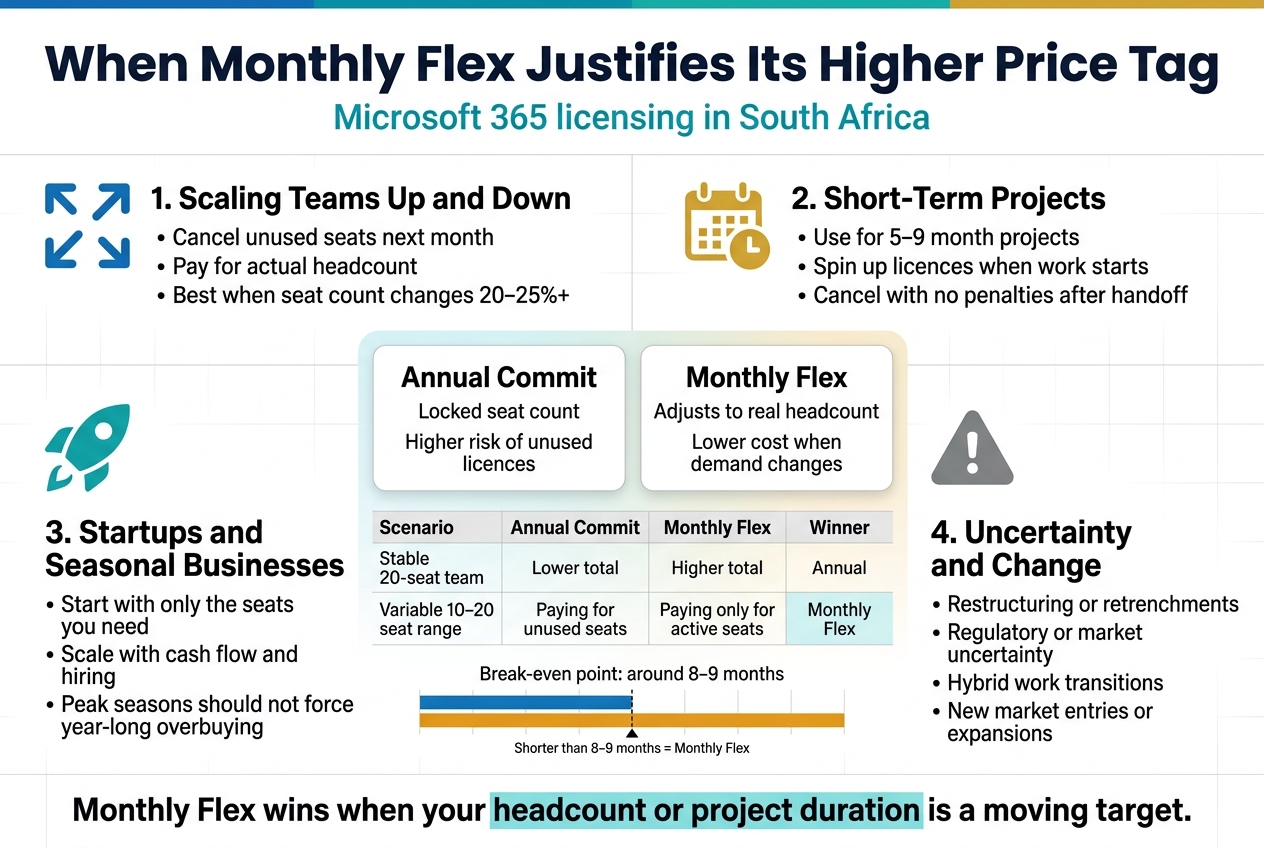
Hiring in South Africa right now is unpredictable. You bring on five new sales reps in Q1, three of them don’t work out by Q3, and suddenly you’re sitting with licences you’re paying for but nobody is using. With an annual commit, that’s your problem to carry until the renewal date rolls around. With monthly flex, you cancel what you don’t need, and next month’s invoice reflects the actual headcount.
This elasticity is where monthly Microsoft 365 licensing in South Africa genuinely earns its higher price tag. The per-licence premium you pay month to month is not just a tax on convenience — it’s essentially an insurance policy against being locked into a seat count that no longer matches your business reality.
Think about what this looks like in practice:
- A recruitment firm that doubles its consultant base during peak hiring seasons and scales back in quieter months
- A software development company that brings in contractors for a six-month product build, then releases them when the sprint is done
- A marketing agency that staffs up around a major campaign launch and winds down once the campaign is live
In all three cases, paying the monthly flex premium makes mathematical sense. The alternative is committing to, say, 20 annual licences when you only need 20 seats for four months of the year. Even if the monthly rate is 20% higher per licence, running 20 licences for four months instead of twelve represents a significant saving in total spend.
The key metric to watch is your average active seat count across the full year. If that number fluctuates by more than 20–25%, monthly flex almost always comes out ahead when you run the total annual figures in rands.
| Scenario | Annual Commit Cost (12 months, 20 seats) | Monthly Flex Cost (4 months, 20 seats + 8 months, 10 seats) | Winner |
|---|---|---|---|
| Stable 20-seat team | Lower total | Higher total | Annual |
| Variable 10–20 seat range | Paying for unused seats | Paying only for active seats | Monthly Flex |
The maths shifts in your favour the moment your seat count becomes a moving target rather than a fixed number.
Short-Term Projects That Do Not Require Full-Year Licences
Not every team member needs a Microsoft 365 licence for the full year. Project-based businesses in South Africa — construction firms, IT consultancies, event management companies, legal firms bringing in specialist counsel — routinely bring people into their environments for defined periods. Locking those people into annual Microsoft 365 licences is a waste of money that adds up fast.
Monthly flex licences are purpose-built for exactly this kind of work. You spin up the licences when the project kicks off, your team members get full access to Teams, Outlook, SharePoint, and the rest of the M365 stack, and when the project wraps up, you cancel. No penalties, no unused seat costs dragging into the next financial year.
Here’s a scenario worth unpacking. A mid-sized construction company in Johannesburg wins a 5-month infrastructure contract. They need to onboard 12 additional site administrators and project managers who will collaborate through Teams and SharePoint. Under an annual commit, they’d be paying for 12 licences for 12 months — even though the need only exists for five. Under monthly flex, they pay five months of premiums and walk away clean.
Even at a 20–25% monthly premium over annual rates, five months of monthly billing is dramatically cheaper than twelve months of annual billing. The break-even point for most Microsoft 365 plans in South Africa sits somewhere around the eight to nine-month mark. If your project or requirement is shorter than that, monthly flex is almost always the cheaper path.
Practical situations where short-term monthly licences make sense:
- Audit and compliance projects with defined end dates
- Seasonal sales drives that require temporary admin or support staff
- Mergers and acquisitions where temporary access to shared environments is needed during due diligence
- Event-based staffing that runs for weeks or months but not a full year
- Pilot programmes where you’re trialling M365 adoption before committing at scale
The flexibility also removes the headache of trying to get licence changes approved mid-contract. With annual agreements, many resellers and Microsoft’s own channel partners require formal amendment processes to add seats. Reducing seats mid-year is often not permitted at all without penalty. Monthly flex sidesteps all of that entirely.
Startups and Seasonal Businesses That Need Cost Flexibility
Cash flow is king in South Africa’s current economic climate, and for startups especially, tying up budget in annual software commitments can be genuinely dangerous. A startup burning through runway cannot afford to have ZAR 3,000–5,000 a month locked into licences that don’t serve the business at full capacity.
Monthly Microsoft 365 licensing gives startups the ability to grow their tooling as their team grows — not before it. You start with three licences when there are three people, add two more when the next hires come on, and never pay for seats that are sitting empty. This sounds simple, but the financial discipline it creates is meaningful when you’re managing a lean operation.
Seasonal businesses face a different version of the same problem. A tourism company operating in the Western Cape runs at full capacity from November through March. Their administrative and operational headcount during peak season might be three to four times what it is in the winter months. An annual commit based on peak-season headcount means overpaying for seven or eight months of the year. A monthly flex approach lets them scale their Microsoft 365 licence cost in ZAR in direct proportion to their actual trading activity.
Seasonal business licensing strategy in practice:
| Period | Active Staff | Monthly Flex Licences | Approximate Monthly M365 Cost (Business Standard) |
|---|---|---|---|
| Nov – Mar (Peak) | 40 | 40 | ~R 8,400/month |
| Apr – Oct (Off-Peak) | 12 | 12 | ~R 2,520/month |
| Annual Total | ~R 59,640 | ||
| Annual Commit (40 seats x 12 months) | ~R 88,704 |
The numbers above are illustrative, but the principle is sound. A seasonal business committing to 40 annual licences to cover their peak period pays for 40 seats for 12 months regardless of whether those seats are being used. Monthly flex, even at a premium per-seat rate, delivers a materially lower total annual cost when seasonal variance is significant.
For startups, the logic shifts slightly. The benefit isn’t just about the maths — it’s about optionality. A startup that signs annual Microsoft 365 licences for 15 people in January is making a bet on where the business will be in December. If things go sideways, the pivot happens, or the team structure changes dramatically, that annual commitment becomes a sunk cost. Monthly flex keeps the business agile without penalising growth or contraction.
Avoiding Long-Term Commitment During Periods of Uncertainty
South Africa’s business environment has a way of throwing curveballs. Load shedding schedules shift operational models. Exchange rate movements affect cost structures. Policy uncertainty across various sectors creates hesitation around long-term planning. In this kind of environment, there’s real value in keeping your software licensing as flexible as your operating model needs to be.
Signing a 12-month Microsoft 365 annual commit is a reasonable decision when your business outlook is stable and your headcount is predictable. When neither of those things is true, locking in for a year is a risk that the monthly flex premium actively mitigates.
Consider a few scenarios where uncertainty justifies the higher monthly rate:
Pending restructuring or retrenchments
If your business is going through a Section 189 process or considering a significant restructure, the last thing you want is a Microsoft 365 annual commit based on current headcount. Monthly flex means your licence costs can move in step with your actual workforce changes rather than lagging behind them.
Regulatory or market uncertainty
Businesses in sectors facing regulatory shifts — financial services, mining, energy — may have legitimate reasons to avoid long-term commitments across all operational expenses, including software. Monthly M365 licensing keeps one more line item variable rather than fixed.
Office and hybrid work transitions
Many South African businesses are still working out their hybrid or remote work policies. If you’re in the middle of figuring out how many people need full M365 access versus more limited tooling, committing annually locks you into a licence structure before you’ve fully understood your actual needs. Monthly flex buys you time to get clarity before making a 12-month financial commitment.
New market entries or geographic expansions
If you’re entering a new market, opening a branch in another province or country, or acquiring another business, your licence requirements are in flux by definition. Monthly flex lets you stand up what you need quickly, adjust as the situation becomes clearer, and then lock in an annual structure once the dust has settled.
The premium you pay for monthly Microsoft 365 licensing in South Africa is, in these scenarios, the cost of preserving your ability to make good decisions as circumstances evolve — rather than being forced into decisions by the terms of a contract signed under different conditions. That’s not wasteful spending. That’s smart financial management.
Hidden Factors That Influence Your Total Licensing Cost
Cancellation Penalties and Early Exit Clauses on Annual Plans
Signing up for an annual Microsoft 365 commit plan feels straightforward until you need to get out of it early. This is where many South African businesses get an unpleasant surprise, and it’s a cost that rarely appears in the sales conversation.
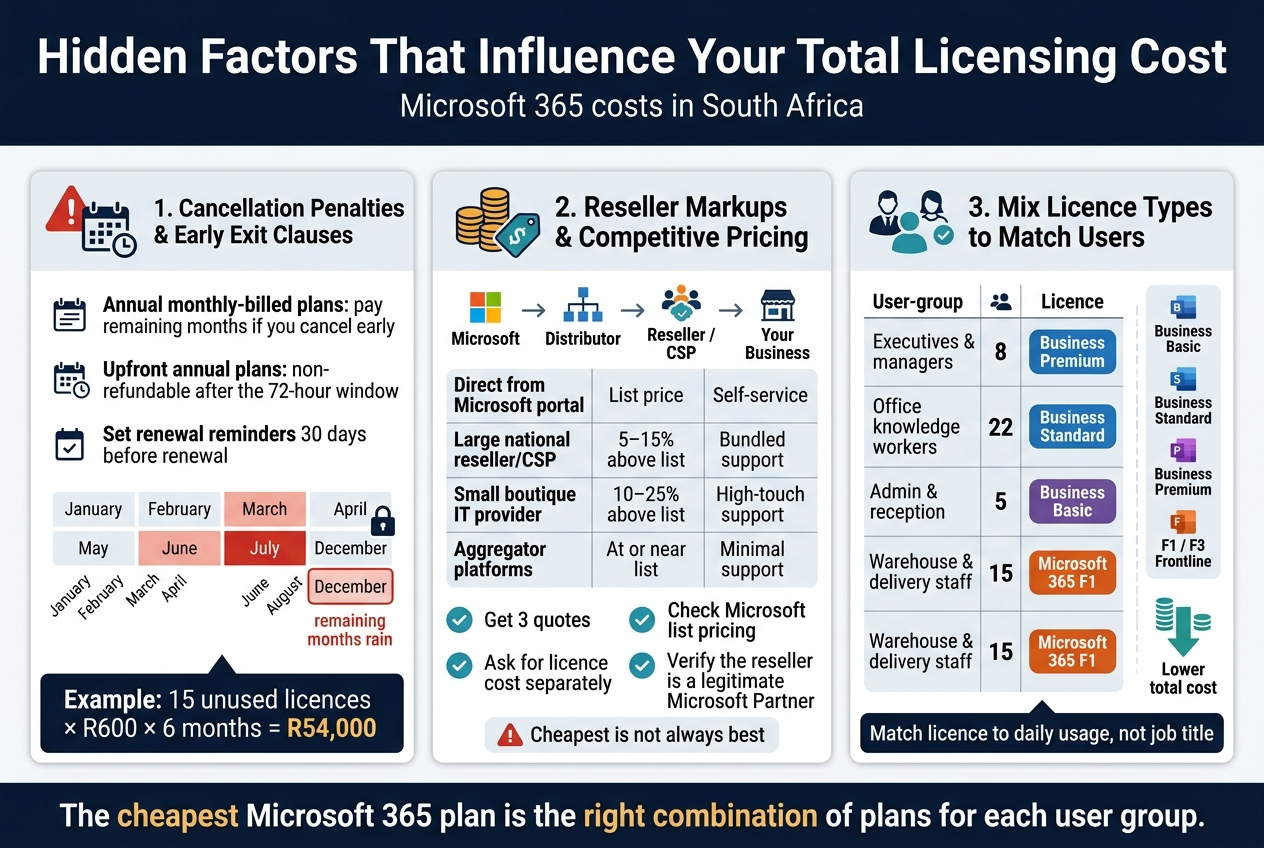
Microsoft’s standard annual commit terms, whether billed monthly or paid upfront, come with real strings attached. If you’ve chosen annual billing paid monthly, you are contractually obligated to pay for the remaining months of the term even if you cancel your subscription. That means if you sign a 12-month agreement in January and try to cancel in August, you still owe Microsoft (or your reseller) for September through December. There’s no goodwill exit clause. You’re on the hook.
If you paid the annual fee upfront, the situation is slightly different but not necessarily better. Microsoft’s standard policy is that upfront annual subscriptions are non-refundable once the cancellation window has passed. That window is typically 72 hours from the initial purchase or renewal. Miss that window, and you’re not getting your money back, regardless of what changed in your business.
What This Means in Rands
To put this in real numbers, consider a mid-size South African business running 30 Microsoft 365 Business Premium licences on an annual commit plan. At a typical Microsoft 365 licence cost in ZAR, that plan might run around R550–R650 per user per month depending on current exchange rates and reseller pricing. If this business decides to downsize from 30 to 15 users six months into the contract, the remaining 15 unwanted licences still need to be paid for until renewal.
That’s potentially 15 licences × R600 × 6 months = R54,000 in licences they’re paying for but nobody is using. That’s not a theoretical number. That’s a very real scenario that plays out regularly when companies restructure, lose clients, or go through economic pressure.
Where Resellers Can Sometimes Help
One thing worth knowing is that your reseller relationship can influence how rigidly these terms are enforced, especially if you’re buying through a Microsoft Cloud Solution Provider (CSP). Some CSP partners in South Africa have flexibility to adjust seat counts mid-term or negotiate exceptions on your behalf, depending on their agreement with Microsoft and your history as a client. This isn’t guaranteed, and it certainly shouldn’t be something you assume, but it’s worth having the conversation upfront before you sign.
Ask your reseller directly:
- Can seats be reduced mid-term, and under what conditions?
- Is there any early exit provision if the business closes or goes through a merger?
- What happens if we need to switch licence types (e.g., from Business Premium to Business Standard) before renewal?
Getting these answers in writing before committing to an annual plan could save you tens of thousands of rands later.
Auto-Renewal Traps
Annual plans renew automatically. If you’re not actively watching your renewal dates, you can roll into another 12-month term without meaning to. Microsoft typically sends a renewal notice, but it’s easy to miss in a busy inbox. Set calendar reminders at least 30 days before your renewal date so you have time to adjust seat counts, change plans, or switch to monthly flex if your needs have changed.
Reseller Markups and How to Find Competitive Pricing
The price you see on Microsoft’s website is not necessarily the price you’ll pay. In South Africa, Microsoft 365 licences are primarily sold through a network of resellers and Cloud Solution Providers, and the markup those resellers apply varies significantly from one to another.
How the Reseller Model Works
Microsoft doesn’t typically sell directly to small and medium-sized businesses in South Africa. Instead, they operate through a two-tier channel:
- Distributors – These are large wholesale partners like Axiz, Rectron, or Westcon who buy licences from Microsoft in bulk.
- Resellers/CSPs – These are the IT companies, managed service providers, and value-added resellers who buy from distributors and sell to you.
Each layer adds margin. That margin can range from a few percent to well over 20%, depending on the reseller’s business model, their relationship with the distributor, and frankly, what they think they can charge.
What This Means for Microsoft 365 Pricing in South Africa
If you’re buying Microsoft 365 licences in South Africa without shopping around, there’s a real chance you’re overpaying. Two businesses could be running identical Microsoft 365 Business Standard setups and paying meaningfully different monthly amounts simply because one did their homework and the other didn’t.
Here’s a rough idea of how pricing can vary across channels:
| Channel Type | Typical Price Position | Service Level |
|---|---|---|
| Direct from Microsoft portal | List price (baseline) | Self-service, limited local support |
| Large national reseller/CSP | 5–15% above list | Bundled support, account management |
| Smaller boutique IT provider | 10–25% above list | High-touch support, local expertise |
| Aggregator platforms | At or near list price | Minimal support, self-managed |
The higher-priced resellers often justify their markup through bundled services — things like helpdesk support, onboarding assistance, licence management, and Microsoft Teams setup. For many South African SMEs, that support is genuinely valuable, especially if the internal IT capacity is thin. For businesses with capable internal IT teams, those bundled services may be unnecessary overhead.
How to Find More Competitive Pricing
-
Get at least three quotes. This sounds obvious, but many businesses simply go with whoever they already have a relationship with. A 10-minute comparison exercise can reveal significant differences in Microsoft 365 pricing in South Africa.
-
Ask for the licence cost separately from services. If a reseller bundles their support into the licence fee, ask them to itemise it. You want to know exactly what you’re paying per licence versus what you’re paying for managed services.
-
Check Microsoft’s own pricing page as a reference. Microsoft publishes list pricing in USD. Use the current exchange rate to get a rough ZAR baseline. Any reseller quoting significantly above that baseline owes you an explanation of what value they’re adding.
-
Consider Microsoft’s direct CSP portal. Some businesses are eligible to manage their Microsoft 365 licences directly through Microsoft’s partner centre or through low-overhead online platforms. This won’t suit everyone, but for tech-confident businesses, it removes a layer of markup.
-
Negotiate at renewal time. Resellers are much more open to pricing conversations when you’re approaching a renewal and they know you’re evaluating alternatives. Use that leverage.
The “Cheaper” Reseller Trap
One caution worth flagging: the cheapest reseller isn’t always the best choice, particularly when it comes to Microsoft 365 licensing in South Africa. Some low-cost providers cut corners on support, may not be properly registered CSPs, or could have compliance issues with their licensing arrangements. Always verify that your reseller is a legitimate Microsoft Partner. You can check this on Microsoft’s partner directory. Buying through an unverified provider could expose you to licence compliance risks that cost far more than any saving you made upfront.
Mixing Licence Types to Optimise Cost Across Different User Groups
One of the smartest and most underused strategies for reducing the overall Microsoft 365 licence cost in ZAR is to stop treating all users the same. Most businesses have a range of user types with very different software needs, and buying everyone the same licence tier is almost always more expensive than it needs to be.
Not Everyone Needs the Full Suite
Think about who actually uses Microsoft 365 in your business. You probably have a group of power users — management, sales, finance, project leads — who live inside Teams, use Outlook extensively, create complex Excel models, and access SharePoint daily. These people genuinely need a full Business Standard or Business Premium plan.
Then you probably have another group — warehouse staff, receptionists, delivery drivers, field technicians, part-time workers — who might only need to receive emails, occasionally attend a Teams meeting, or use a basic shared calendar. These users don’t need the full suite. Buying them Business Premium or Business Standard is money down the drain.
What Microsoft Offers for Light Users
Microsoft offers several lighter and lower-cost options that are worth knowing about:
| Licence Type | Best For | Approximate Use Case |
|---|---|---|
| Microsoft 365 Business Basic | Light users needing web-only Office + Teams | Email, Teams meetings, SharePoint access |
| Microsoft 365 F1 / F3 (Frontline Worker) | Field staff, shift workers, deskless employees | Mobile-first access, no desktop Office apps |
| Exchange Online Plan 1 | Email-only users | Basic mailbox, calendar, contacts only |
| Microsoft Teams Essentials | Meetings-only users | External meeting participation, basic Teams |
The price difference between a full Business Premium licence and an F1 Frontline Worker licence is substantial. In ZAR terms, you could be paying three to four times more per user on a premium plan than you would on an F1 plan for someone who only needs mobile access to email and Teams.
A Real-World Mixing Strategy
Here’s how a practical mixed-licence setup might look for a South African business with 50 employees:
| User Group | Number of Users | Licence Type | Reason |
|---|---|---|---|
| Executives & managers | 8 | Business Premium | Full compliance, Advanced security, desktop Office |
| Office-based knowledge workers | 22 | Business Standard | Full desktop Office, Teams, SharePoint |
| Admin & reception | 5 | Business Basic | Web Office, email, Teams — no desktop apps needed |
| Warehouse & delivery staff | 15 | Microsoft 365 F1 | Mobile email, Teams meetings only |
This kind of segmentation can shave hundreds to thousands of rands off the monthly licence bill compared to buying Business Standard or Business Premium across the board. Over a year, that saving compounds significantly.
How to Implement Mixed Licences Without Chaos
Mixing licence types does add some administrative complexity. You need to make sure each user has the right licence assigned to their account, and that users on lighter plans aren’t getting frustrated by feature gaps they encounter day-to-day. Here’s how to manage this cleanly:
- Document which features each role actually needs before assigning licences. Talk to team leads, not just IT.
- Use Microsoft 365 admin centre to manage licence assignments. It’s straightforward, and you can adjust individual users as their roles change.
- Set expectations with users on lighter plans. If a warehouse worker on an F1 licence tries to open Word on their desktop, it won’t work. Make sure users know what’s included in their plan to avoid support tickets and frustration.
- Review annually. People’s roles change. Someone promoted from a frontline role to a team leader position will quickly outgrow an F1 licence. Build a review process into your annual renewal cycle so you’re always matching licences to actual usage.
Annual vs Monthly Mixing
You can apply the annual commit vs monthly flex decision independently to different licence groups. For example, your core knowledge workers on Business Standard might be on annual commit because their headcount is stable, while your frontline workers on F1 are on monthly flex because shift workforce numbers fluctuate seasonally. This layered approach gives you cost certainty where you have stability and flexibility where you need it.
The key insight is that the cheapest Microsoft 365 plan in South Africa for your business isn’t a single plan at all — it’s the right combination of plans matched to what your people actually do every day.
Choosing the Right Plan for Your Specific Business Situation
Small Businesses With Fixed Staff Benefit From Annual Commit
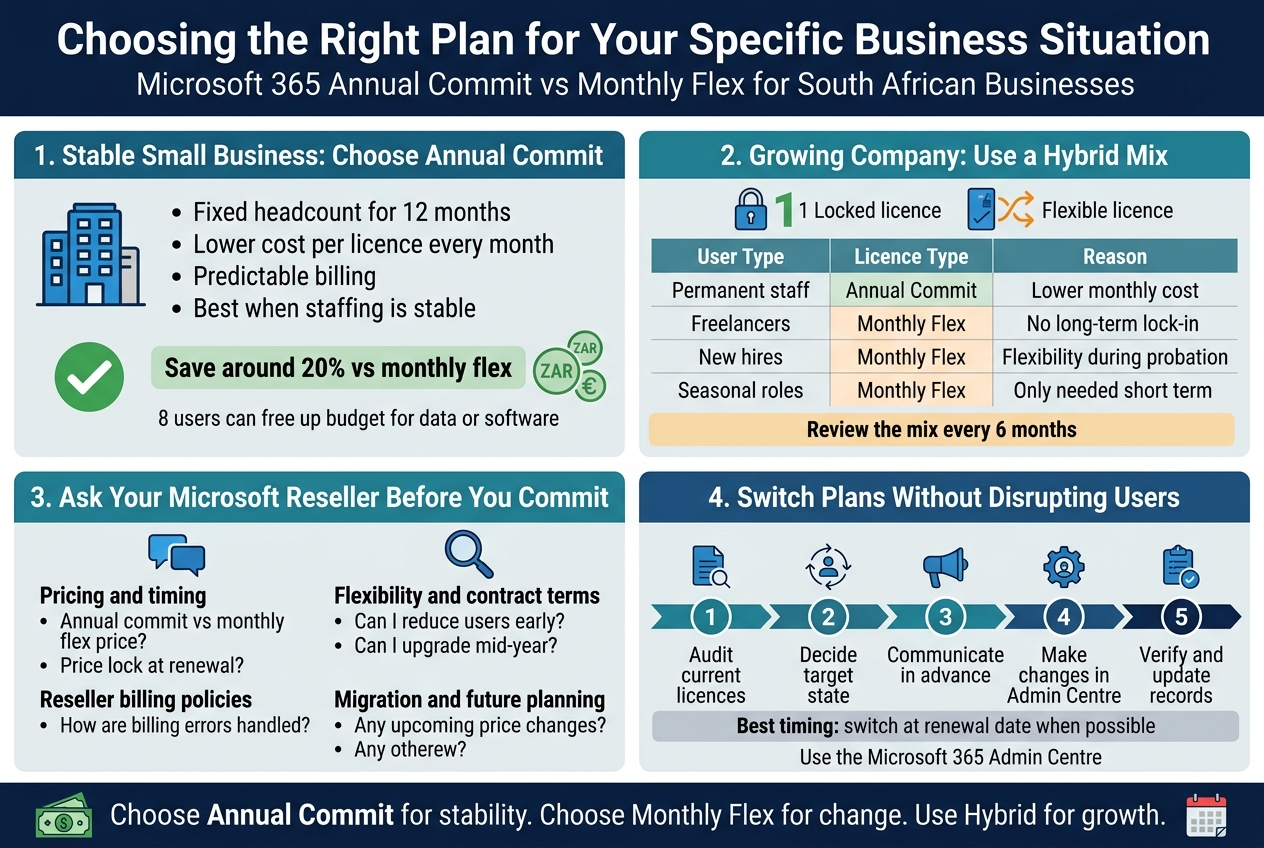
If your headcount has been the same for the last 12 months and you have no plans to hire or restructure, annual commit is almost certainly the right call for your business. The maths are straightforward: you pay less per licence per month, every month, for the full year. When you multiply that saving across even five or ten users, the rand difference adds up to real money you can redirect elsewhere in the business.
Consider a small accounting firm in Johannesburg running 8 users on Microsoft 365 Business Standard. The gap between annual commit and monthly flex pricing in South Africa typically sits around 20% depending on the currency exchange rate at the time of purchase. On 8 licences over 12 months, that saving could easily cover a month’s worth of data costs or go toward another software subscription the team actually needs.
The key advantage for small businesses with stable teams is predictability. You know exactly what you are paying every month. There are no surprises, no rate fluctuations based on how many people happened to be on payroll that particular billing cycle, and no risk of accidentally leaving a licence active for someone who left the company. You set it, you pay it, and you get on with running your business.
There are a few things small businesses should keep in mind when going annual:
- Assign licences carefully at the start. You are locked in for 12 months, so assign each licence to the right person from day one.
- Use the full feature set. Annual plans often unlock capabilities that are watered down or unavailable on monthly flex tiers, depending on the plan. Make sure your team is actually using what they are paying for.
- Plan your renewal date. Mark it in the calendar at least 60 days in advance so you are not caught off-guard by an auto-renewal at a potentially different price point.
For small South African businesses watching every rand, the annual commit on Microsoft 365 licensing in South Africa is the cheapest path if stability is your reality.
Growing Companies Should Consider a Hybrid Approach
Growth is a good problem to have, but it makes licensing messy. If you are scaling your team, opening new offices, or going through a phase where headcount changes quarter to quarter, locking every single user into annual commit from the start can come back to bite you.
The hybrid approach is a practical middle ground that many South African businesses overlook because it sounds more complicated than it really is. The idea is simple: you put your permanent, long-term staff on annual commit licences, and you keep a pool of monthly flex licences available for contractors, temporary staff, new hires in their probation period, or roles you are not sure will last past the next financial year.
Here is what a hybrid structure might look like for a Cape Town-based marketing agency with a mix of permanent staff and freelancers:
| User Type | Licence Type | Reason |
|---|---|---|
| 10 permanent staff | Annual Commit | Fixed headcount, lower monthly cost per user |
| 3 freelancers on 3-month contracts | Monthly Flex | Short-term engagement, no long-term lock-in |
| 2 new hires in probation | Monthly Flex | Flexibility to remove if role does not work out |
| 1 seasonal campaign manager | Monthly Flex | Only needed for 2 months of the year |
The permanent staff benefit from the cheaper annual vs monthly Microsoft 365 rate, while the business retains flexibility for everyone else. When a contractor’s engagement ends, you cancel the monthly licence and stop paying immediately rather than sitting on an unused annual seat.
The main thing to get right with a hybrid approach is tracking. You need a simple system, even just a shared spreadsheet, to know which user is on which licence type, when contracts end, and when annual licences are due for renewal. Without that visibility, it is very easy to end up paying for licences nobody is using.
Growing companies should also revisit their mix every 6 months. If three of those monthly flex users have now been with the company for over a year and show no signs of leaving, convert them to annual commit and immediately start saving on those seats.
Questions to Ask Your Microsoft Reseller Before Committing
Choosing between annual and monthly is not a decision you should make in isolation, especially in South Africa where the rand price of Microsoft 365 licences can shift based on exchange rates, reseller margins, and promotional pricing windows. Your Microsoft reseller has information you do not, and asking the right questions before signing anything can save you a significant amount of money.
Here are the questions worth raising in that conversation:
On pricing and timing:
- What is the current rand price per user per month for annual commit versus monthly flex on the plan I need?
- Is there a price lock guarantee on my annual commit, or can the price change at renewal?
- Are there any current promotions or volume discounts available that I should know about before I sign?
- How does the pricing change if I add more licences mid-year?
On flexibility and contract terms:
- What happens if I need to reduce my user count before the annual term ends?
- Can I upgrade a user from a lower tier to a higher tier mid-year, and what does that cost?
- If I need to move a licence from one user to another, how is that handled?
- Is there a minimum seat count that qualifies for annual commit pricing on this plan?
On reseller-specific policies:
- Do you manage billing directly, or does it go through Microsoft’s admin portal?
- What is your process if there is a billing error or a licence is incorrectly charged?
- Do you offer any bundled support or onboarding with the licences, or is it purely transactional?
On migration and future planning:
- If we want to move from Microsoft 365 Business to an Enterprise plan later, how does that transition work?
- Are there any upcoming pricing changes I should factor in before committing for 12 months?
A good reseller will answer these questions without hesitation. If you are getting vague answers or pressure to sign quickly without having your questions addressed, that is a red flag worth taking seriously. Buying Microsoft 365 licences in South Africa through the right partner makes ongoing management far simpler, especially when something goes wrong or your needs change.
Steps to Switch Between Plans Without Disrupting Your Users
Switching licence types or plans is something many businesses put off because they are worried about disrupting their team. The good news is that with a bit of planning, it is much smoother than it sounds. The key is knowing the correct sequence of steps and understanding what actually changes for end users versus what only changes in the billing and admin backend.
Step 1: Audit Your Current Licences First
Before making any changes, log into the Microsoft 365 Admin Centre and export a full list of your current users, their assigned licences, and what features each licence includes. This gives you a clean baseline. You want to know:
- Who is on what plan
- Which licences are assigned versus unassigned
- Which annual licences are due for renewal in the next 90 days
- Whether any users are sharing licences they should not be
Step 2: Decide What the Target State Looks Like
Map out what you want the licensing structure to look like after the switch. If you are moving a group of users from monthly flex to annual commit, list those users specifically. If you are switching plans entirely, confirm that the new plan includes all the apps and features your team currently relies on. The last thing you want is to switch 20 users to a new plan and discover that plan does not include Microsoft Teams or does not offer the mailbox size your team needs.
Step 3: Communicate With Affected Users in Advance
If users are moving between licence tiers, some of them may notice a change in what applications are available to them. Even if you do not expect any major disruption, a short heads-up email sent a few days before the change tells your team what to expect and stops the IT helpdesk from being flooded with “why can’t I access this?” calls on the day of the switch.
A simple message works perfectly well:
“We are updating our Microsoft 365 licences on [date]. You may notice a brief update to your apps. No action is needed from your side, but please reach out if you experience any issues.”
Step 4: Make the Changes in the Admin Centre
Licence changes are made directly in the Microsoft 365 Admin Centre under Users > Active Users. Select the user, go to their licence assignments, remove the old licence, and assign the new one. For a large number of users, you can use bulk actions or PowerShell scripts to speed up the process significantly.
If you are working with a reseller, they can often make these changes on your behalf through their partner portal, which may be faster depending on your setup.
Step 5: Verify the Changes Immediately
After assigning new licences, spot-check three to five users by logging into their accounts or asking them to confirm they can access the right applications. Check that email is working, that Teams is loading, and that any specialist apps like Intune or Defender for Business (if applicable) are still active.
Step 6: Update Your Internal Records
Update whatever system you use to track licences, whether that is a spreadsheet, an IT asset management tool, or a note in your accounting system. Record the new plan name, the monthly cost in ZAR, the user assigned, and the renewal date if it is an annual licence.
This kind of housekeeping feels tedious but pays off when renewal time comes around. Knowing exactly what you have and what it costs makes the decision between annual commit and monthly flex much easier every single year.
A Note on Timing Your Switch
If you are currently on an annual commit plan and want to switch to a different plan, the cleanest approach is to time the transition to coincide with your renewal date. Switching mid-term can result in pro-rata charges or credits depending on your reseller’s billing terms, and it is easier to plan when you are working with a clean start date. If a mid-term switch is unavoidable, ask your reseller to confirm exactly what the financial impact will be before you proceed so there are no unexpected charges on the next invoice.
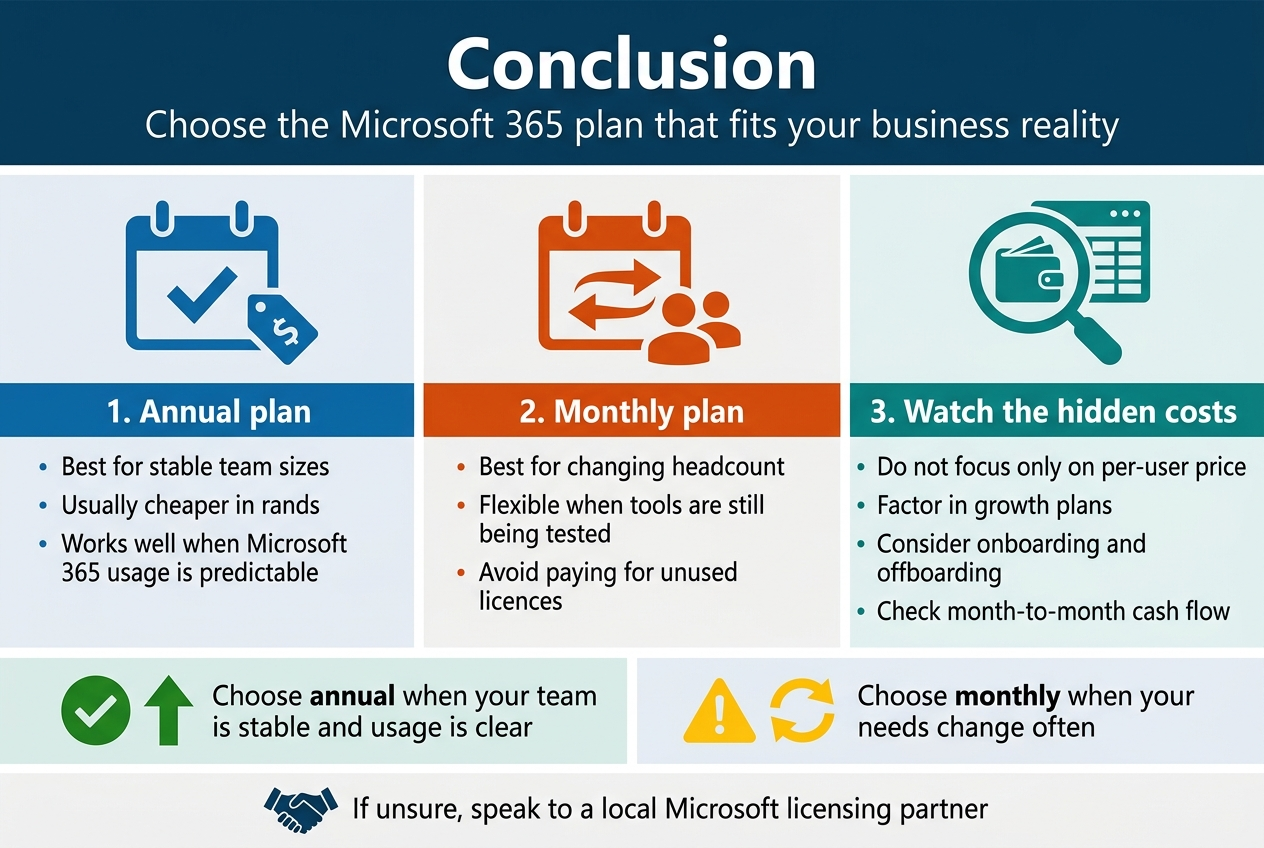
Picking between an annual commitment and a monthly flexible plan really comes down to knowing your business well. If your team size is stable and you’re confident in your Microsoft 365 usage, locking in an annual plan is almost always the cheaper route when you crunch the numbers in rands. But if your headcount shifts regularly or you’re still figuring out which tools your team actually needs, that monthly flexibility can save you from paying for licences that nobody’s using.
The hidden costs are where most businesses get caught off guard, so don’t just look at the per-user price. Factor in your growth plans, how often you onboard or offboard staff, and what your cash flow looks like month to month. Take what you’ve learned here, map it against your actual business situation, and make the call that makes financial sense for your company, not just the one that sounds good on paper. If you’re still unsure, chatting with a local Microsoft licensing partner can help you avoid a costly mistake.